ConfigMgr 2012 Beta 2–Tomorrow?
During the State of the Union session at MMS this morning, there may have been a slip of the tongue by one of the presenters. They had been saying that Beta 2 for ConfigMgr is “very soon”…then at one point I’m almost positive that I heard a slip of the tongue stating “when you download it tomorrow”.
By no means definitive, and could have just been a slip that is not based in reality…or it could have been a slip to an announcement that was being held for tomorrow.
Logging Task Sequence Variables
How many times have you worked with Task Sequence variables via either a script or CustomSettings.ini and really needed to know what the value of a particular variable was at a specific point in the task sequence? I really need to know what that variable is so that I can use it appropriately for some of the customization I have set around the variables.
One of the most helpful posts I have come across in the last several months was written by Daniel Oxley on the Deployment Guys blog. It was a post from a while ago that essentially shows how to easily log the variables. You simply download the VBS from his post and put it in the scripts folder of your MDT package. Then just call the script via a “Run command line” task. It dumps a log to the standard logs folder on the client with Variable/value for every variable that is currently in use. One cool thing is that it names the file based on date/time stamp, so you can run it multiple times in the same task sequence to see how the variables change as it walks through the process. I found it to be immensely helpful when working with some of the other MDT scripts that are customized heavily on variables.
Check out Daniel’s post and download the script here.
Computer Association Script
Fairly recently I was talking with someone who was in the midst of an XP to Windows 7 migration. They were replacing groups of computers and using a ConfigMgr task sequence to install Windows 7 on the new computers…with the USMT integration migrating the user state. Now…before that can be done, there are a few things that have to be set up:
- Create a Computer Association between the old computer and the new computer
- Add the old computer to a collection that will run a task sequence to capture the user state
- Add the new computer to a collection that will install Windows 7 and restore the user state
The guy I talked with was having a very slow time manually clicking through the ConfigMgr GUI to create these Computer Associations one by one. That is an awful lot of clicks and it was obviously slowing down his ability to move the migrations along at the speed he wished.
So…I did a little internet scavenging of scripts and put them together inside a different framework. I freely admit that my main contribution to this was pulling key components out of the other scripts and putting them into a framework that worked well for this purpose. The end result is that the task that was taking several hours for him to do by hand is now accomplished in a few seconds.
First there was a script that I found referenced by several people that was originally written by a guy named Mark Nunn. His website is now dead, but I found where his “Add to Collection” script was available on myITforum.com. From this I mainly pulled the command for adding to a collection along with how to equate a computer name to the SMS ResourceID.
Second was an excellent post by Donnie Taylor. His script will create the computer association one at a time via command line arguments. It does require that the command line argument be the SMS Resource ID of the computers. His script showed the command line for creating the computer association along with having a basic logging function.
I took those two and put logic around them to create a script that will read computer names from a CSV file, query ConfigMgr to find the SMS ResourceID, then create the association and add each computer to the appropriate collection. The list.csv file expects the first column to be the computer names of the “old” computers and the second column to the the “new” computers. The script does expect a command line argument of “import” before it will do anything. Read through it carefully…you will need to set the name of your server, the path to the CSV and the path to the log file, along with setting the Collection IDs of the Capture and Restore collections that the computers will be added to.
There are definite limitations to the script. If a computer name is in ConfigMgr more than once…I honestly don’t know what it will do. I think it will grab the first one that it finds, but I don’t know for sure. I’m sure there are others, but that is a glaring one. Feel free to download and use…but as always…use at your own risk…the script is free…you get what you pay for! You can download it from my SkyDrive.
4th Annual MMS Bible Study
This is a message for anyone going to MMS 2011 in Las Vegas who would be interested in coming to a morning Bible study/prayer time. This will be the fourth year running that a group of us have met before breakfast on Tuesday through Friday mornings at the event. The group has varied from year to year based on who was able to come to MMS, but we’ve had a good turnout and some good connection time every year. I’m looking forward to reconnecting with some of the “regulars” as well as meeting some new folks.
This year I will be leading the study time again and will be taking us on a brief tour of the book of Romans. My current plan is for the first day to be a high level overview of the book and the other three days to specifically look at Romans 12. I’m early in the prep though, so that could change!
If you would like more info on the study, please email me to let me know. Same as every year, I won’t be posting location on the blog to protect the privacy of whoever is hosting the study…I will be emailing specific location information to those who email me.
Looking forward to seeing you there. Two weeks and counting!!!
Headed to Orlando
Many people reading my blog know that I spent fifteen years on the missionary staff of Campus Crusade for Christ before getting into consulting. Last year as I was contemplating a job change, one of my CCC friends contacted me about doing some ConfigMgr training for them…which was an exciting prospect. My original plan was to do the training for them after leaving my former employer but before starting at my new employer…then my new employer asked me to start a bit earlier than I had planned…and they would still honor the deal I had worked out with CCC for the week of training. It was a win-win scenario.
So…next week is the Orlando week. It’s going to be an exciting week working with these guys that I already know well. I’ve really been looking forward to this! Goals for the week are:
- Work with the guy who I trained to be my replacement (Jeff Boehlke) on several improvements to the ConfigMgr infrastructure. (R3, MDT integration, security delegation)
- Train the Jesus Film guys (Brent, Steve and Scott in particular) in how to use ConfigMgr.
- Work with both Jeff and the JF guys to set up OSD for Windows 7 x64. They already have the framework in place…just need it set up.
Also…not bad being able to leave MN in February where it is currently 5 below Zero to head to Orlando for a week!
And to my Orlando CCC friends…hopefully I get to see some of you on breaks from working with Brent, Jeff, Steve and Scott. I will definitely drop in on the NCO to visit at some point.
ConfigMgr Failing to Run Vbscript
I’ve had a vbscript that I wrote for setting a registry key that has been causing me problems today. It’s a pretty simple script…just writing a DWORD value to HKLM to disable the backup notification in the Windows 7 Action Center. The script works fine in my testing…both running as an admin and running as Local System. I had already deployed the script to numerous computers in a pilot group, and the advertisement status was reporting that the script was completing successfully. Then I got a call saying that the notification was still showing up. I checked the machine, and the registry entry was not there…even though the script ran successfully.
After beating on it for a while I discovered the problem…the 64 bit redirection is getting in the way. In a nutshell, if a 32bit program attempts to write to certain sections of the registry, the registry call is redirected to HKLM\Software\Wow6432Node instead. This is essentially the “32 bit section” of the registry. In this instance, the script is being run by the ConfigMgr client…which is a 32bit program. The script was completing successfully…writing to the Wow6432Node instead of where I needed it to write. I did a ton of research to try to find a way around it from within the script, but was unable to figure out how to do it from within the script. However…there is a way to accomplish what I am wanting to do in ConfigMgr…
- Set up a Custom Task Sequence and use a “Run Command Line” step.
- Point that step to use the ConfigMgr package containing your script.
- The command line should be “cscript.exe scriptname.vbs” (without the quotes of course)
- Ensure that the checkbox for “Disable 64-bit file system redirection” is checked.
- Advertise that Task Sequence to the computers that you need it to run on.
After doing that, it worked like a charm.
Task Sequence Not Downloading Updates
I have seen issues over time where during a Task Sequence…and many times specifically in the Build and Capture task sequence…where updates would fail to download. The symptom is that the Task Sequence appears to simply hang at the download updates step. The percent complete that it hangs at varies. I looked through several logs and found a correlation that ended up pointing to a 401.2 HTTP Error Code. When I dug into the package that it was trying to download the content from…it ended up being an obsolete SW Updates Package that was no longer being used (ABC12345 in the logs below). I deleted that package, restarted the task sequence, and it installed updates without a problem. I honestly don’t know if it was a corruption in the package, or if there was some superseded/expired/etc updates that it wasn’t liking. Not sure exactly what the issue is…but deleting the package that I wasn’t using anyway appeared to resolve the issue.
The logs I looked at to find the correlation were:
smsts.log
Installing all updates targetted for this computer
Installation of updates started
Waiting for installation job to complete
Waiting for job status notification …
UpdatesHandler.log
Starting download on action (INSTALL) for Update (…)
Filebits.log
FileCopyJob {…} encountered error while retrieving file info (0x80070005).
DataTransferService.log
[CCMHTTP] HTTP ERROR: URL=<http_ConfigMgrServer:Port</SMS_DP_SMSPKGE$/ABC12345/54608fa1-5b28-4e05-ba25-e9e59cedff5a, Port=80, Protocol=http, SSLOptions=0, Code=0, Text=CCM_E_BAD_HTTP_STATUS_CODE
Raising event:instance of CCM_CcmHttp_Status … HRESULT = "0x8004027e" … StatusCode = 401 …
Error sending DAV request. HTTP code 401, status ‘Unauthorized’GetDirectoryList_HTTP(<http_ConfigMgrServer:Port</SMS_DP_SMSPKGE$/ABC12345/54608fa1-5b28-4e05-ba25-e9e59cedff5a’) failed with code 0x80070005.
IIS logs on the Distribution Point
PROPFIND /SMS_DP_SMSPKGE$/ABC12345/54608fa1-5b28-4e05-ba25-e9e59cedff5a – 80 – ip_address SMS+CCM 401 2 5 15
OSPP.VBS – Unsupported Command Passed
I’ve been working on automating the activation of Office 2010 during the initial installation at a client who is using Multiple Activation Keys (MAK). I wanted to be able to script the activation instead of having the activation window pop up when an Office application runs. Microsoft includes a method for doing this in the installation of Office 2010. It is a vbscript that is in the installation directory for Office 2010 (C:\Program Files (x86)\Microsoft Office\Office14 by default). It is the Office Software Protection Platform script (OSPP.vbs).
So, I found multiple places where the syntax for using OSPP.vbs is wrong. The places where I found the syntax to be wrong were mostly blogs…some TechNet blogs as well as plenty of non-Microsoft sites. The link above is to the documentation for the tool which has the correct syntax. The incorrect syntax that I found had the switches for the tool referenced with a dash instead of a forward slash. Using the dash in the command causes a message box to pop up stating “Unsupported command passed.”
Below are examples of both the incorrect and correct syntax for scripting the activation using OSPP.vbs.
Incorrect Syntax (note the –act)
cscript ospp.vbs –act
Correct Syntax (note the /act)
cscript ospp.vbs /act
App-V protocol specified in OSD file is not supported
I’ve been putting together a proof of concept environment for Microsoft Application Virtualization (App-V), and ran across this error when testing app streaming.
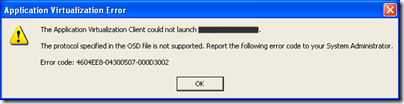
The fix was really easy…don’t forget to escape the backslash characters in the OVERRIDEURL section of the install path…just like the documentation says to do. So…the command line should look something like this (note the double backslashes in the OVERRIDEURL parameter):
msiexec.exe /i "Package.msi" MODE=STREAMING OVERRIDEURL="\\\\SERVER\\SHARE\\FILE.SFT" LOAD=TRUE /Q
XP Mass Storage Drivers – a Better Way
Anyone who has done Operating System Deployment with ConfigMgr will tell you that the toughest part of getting it working is mass storage drivers…simply getting XP to be able to talk to the hard disk after the image is laid down. The root of the issue is that the new hardware that we are deploying Windows XP onto didn’t exist when XP was released. In particular, the hard disk controllers are new, and XP doesn’t have drivers to be able to communicate with the newer hardware…it needs a driver. In particular, most corporate computers have an Intel chipset, but XP has no native support for the AHCI/RAID chipsets. XP needs the Intel Matrix Storage Manager driver for these chipsets.
This typically comes out during a deployment as a Blue Screen of Death with a Stop Code of 0x0000007b (0x7b). If you ever see that stop code…most likely it is a mass storage driver issue.
Now…I’ve battled these for a while. ConfigMgr includes the ability to dynamically inject the driver during the deployment which is great. It works well as long as you know specifically which driver goes with a given computer (see my previous post). However it is cumbersome. If you don’t know the driver, you can waste a good bit of time figuring out which driver to inject. There’s got to be a better way…and there is. At the last Minnesota System Center User Group, Joey Gleason mentioned a really helpful portion of a session from MMS related to that. In it Ben Rampe talks about this very problem and does a good job of outlining a better way of handling this. I reviewed the session and found it to be very helpful. The rest of this blog post is a combination of knowledge I had previously and info from that session. The outline of the rest of this post looks a lot like Ben’s slidedeck…which is to be expected in a technical post…there are only so many ways to outline the same process. :-)
XP Mass Storage Drivers
Continuing the theme of clearing stuff from my inbox…here is one that has been there since late January. It is simply a list that correlates a few mass storage drivers to a few computer models. This is obviously not comprehensive…just what I had in that email. Thanks to Chris Muster for sending me this list.
- ICH7M
- HP TC4400
- ICH8R
- Dell Optiplex 745
- ICH8M
- Dell Latitude D820
- Dell Latitude D620
- Dell Latitude D420
- Dell Latitude D830
- Dell Latitude D630
- Dell Latitude D430
- Toshiba M700
- ICH9R
- Dell Optiplex 755
- Dell Precision T3400
- ICH9M
- Dell Latitude E6400
- Dell Latitude E6500
- Dell Latitude E4200
- HP Elitebook 2730P
- ICH10D
- Dell Optiplex 760
- Dell Optiplex 780
- 631xESB/632xESB
- Dell Precision 690
ConfigMgr PowerShell syntax
A few months ago I finally discovered the PowerShell Module that Michael Niehaus wrote. I love the flexibility it offers…not to mention the speed of performing repetitive tasks. Some of the syntax was a bit confusing to me on some of the commands…in particular the ones that require the “NALpath”. I was using the “new-sccmpackagedp” command which requires the NALpath as a parameter. Once I figured it out, I emailed the command to myself…where it has been sitting since the middle of June. This post will clear that email out of my inbox!
Syntax for the New-SCCMPackageDP command in PowerShell:
New-SCCMPackageDP -PackageID ABC00012 -NALpath ‘["Display=\\servername\"]MSWNET:["SMS_SITE=ABC"]\\servername\’ -sitecode ABC
From what I could see on Niehaus’s blog, he doesn’t have a direct link to the module that he wrote. The best I could find was that he included version 1.5 of the module in a zip file along with something else he wrote. Here is the blog post, and the direct link to the zip file that includes the module.
Big time thanks to Michael for writing and posting such an awesome resource!!!
WMIC ConfigMgr Actions
A while back I was looking for a command line method of triggering inventory. Most of the posts that I found were vbscripts that could trigger the action via the control panel applet…but you ran into an issue with this method if you were triggering it on a 64bit OS…because the ConfigMgr applet is a 32bit applet….which can’t be triggered from the 64bit cscript. It can still be done by switching to the 32bit cscript, but it’s a bit cumbersome.
I was bouncing this issue off of Brian Mason, and he reminded me of a blog post by Kim Oppalfens re: triggering ConfigMgr stuff with WMIC. Kim’s post is specifically around adding right click actions to the ConfigMgr console, but they can be used from the command line also.
He lists a lot of them in his post (which I strongly encourage you to check out), but the two that I was needing for inventory are:
Hardware Inventory: WMIC /node:Computername /namespace:\\root\ccm path sms_client CALL TriggerSchedule "{00000000-0000-0000-0000-000000000001}"
Software Inventory: WMIC /node:Computername /namespace:\\root\ccm path sms_client CALL TriggerSchedule "{00000000-0000-0000-0000-000000000002}"
If copying and pasting, be careful to ensure that the quotes are normal straight quotes instead of “smart quotes”.
Side note: if you have access to view the sessions from MMS this year, be sure to download and watch Kim’s session. It was re-scheduled for the last day because he was unable to fly earlier in the week because of the volcano in Iceland. There were only approx 50 of us at his session…but it was one of the best of the event…definitely 400 level.
8-26-95
Today is my fifteenth wedding anniversary. It’s hard to believe that it has been fifteen fantastic years with Julie. Not that there haven’t been rough times…there have…but you hold on and grow through those times. If you fight FOR your marriage (instead of just fighting) you end up closer in the end. I am glad to have committed to spending the rest of my life with Julie…I’m looking forward to the next 50 years!
On our tenth anniversary I took a song by Steven Curtis Chapman, modified the lyrics and sang it to Julie as an anniversary present. The original song was titled “11-6-64” and was written by SCC for his wife’s birthday. That song was included on SCC’s “All About Love” album which was essentially 16 love songs…most of which he wrote for his wife. I am indebted to him for that album. Until now, only a few family members and friends have seen this song.
8-26-95
8-26-95 the sun shone a whole lot brighter
Than ever it had before, smiling down on me
Around 11 am both hands of time stopped turning
And you came waltzing in, to change my world for good
And you were all that I could see, and when you looked at me
Everything just faded
And I, I know I smiled and prayed
Harder on that day
Cause my whole world was changing on
8-26-95, we both said “I do”
And suddenly living life meant so much more
On the day that we were wed.
And I, I woke up with the dew; I was thinking of you
And all that was transpiring
Well, I, I know the sky was blue
And all the world looked new
Cause everything was changing on
8-26-95, we both said “I do”
And suddenly living life meant so much more
On the day that we were wed
8-26-95
Suddenly living life meant so much more
On the day that we were wed.
8-26-95
Original words and music by Steven Curtis Chapman
Adapted by Jarvis Davis
8-26-2005
Switchfoot – Church Offering
Okay…a brief mental break from work…
One of the guys who leads music at our church (Church of the Open Door) is Joel Hanson. Joel is probably best known for being one of the members of the Christian rock band PFR. He and the guys in our church band are very talented. The song that they played while the offering was taking place yesterday was “Mess of Me” by Switchfoot. They may have actually sounded better than Switchfoot. Listen to the video below (really loud if you can)…and picture it being played in church. :-)
[Edit: Okay…I just realized that the video is set to not allow embedding…so you will have to go directly to Youtube to view it.]
Now…back to work… :-)
Advertising a Task Sequence to a User
I had a fun little task this week…do the impossible with ConfigMgr…make a Task Sequence advertisement applicable to a user. Now…Task Sequences were originally designed for Operating System Deployment, and as such they can only be advertised to a computer account…not a user account. But…there are certain applications that we need to install via a Custom Task Sequence. (For example…SQL 2005 Client Tools or Visual Studio 2008. In both cases, the service pack can’t be slipstreamed into the install, so it must be installed separately.)
Now in most instances, I want the service desk to be able to deploy software, but I don’t want to give them access to the ConfigMgr console. One of the easiest ways to accomplish this is by allowing them to modify an AD group for SW deployment. That works well…except that for an app that is installed via a task sequence, they will have to remember to add a computer account (that they will have to hunt down) instead of the user account. I would much prefer that their process is the same for all software…just add the user account. So…here is my criteria:
- App is installed via a Custom Task Sequence
- A task sequence can only be advertised to a computer account
- All software is advertised to collections based on AD user groups
- Want to maintain the same process
How can I accomplish this? Well…let’s separate the two parts of the process and tackle it differently. The two parts are:
- The service desk does (add a user to an AD group)
- The software gets deployed to the computer that the user is logged into.
Let’s come back to #1 and look at #2 first. There isn’t a special setting/switch/etc to make it possible to advertise a task sequence to a user account. That advertisement still has to be targeted at a computer. Now…what are the ways that I can get a computer account into a ConfigMgr collection? There are several:
- Direct membership – with ConfigMgr console access, I can simply add the computer account to the collection.
- Query based – which can be based on any number of things. Common ways of doing this are:
- Subselect query – a query to determine all systems that don’t have the software – then install it.
- AD group/OU/etc membership.
- HW/SW inventory – something in inventory that can be used to trigger the installation.
Now…of those options, we can rule out the direct membership option because I don’t want the service desk to have console access. I can also rule out the subselect, because this is not software that all users should have…it is more specific. I’m also ruling out the AD group membership, because I still want the service desk to only be concerned with adding USER accounts to the AD group. That leaves me with inventory…which gives me options for how to get around my limitation.
What are things that inventory is already grabbing for me…or that I can modify it to grab? I could modify the HW inventory to grab custom registry keys. Or…depending on how I have SW inventory set, I can use it to tell me if certain files exist. By default, all EXEs are inventoried. That is my opening…
What I CAN do is advertise a vbscript to a user or user group. That vbscript does nothing more than create a text file…with an EXE extension that will be picked up by SW inventory. Now…I don’t want to wait for the next inventory cycle, so I can have the vbscript also kick that off for me. So…the script simply writes a file and kicks off inventory.
My task sequence is targeted at a collection that targets computers that have a certain EXE file. This solves my issue. I can now have the service desk add a user to a group. This triggers an advertisement (mandatory and silent) that runs a vbscript that creates an EXE file and triggers the SW inventory. Because the EXE file will then be part of the inventory for the computer account, I can now create another collection/advertisement to target the installation of the software to computers that have the EXE created by the vbscript.
Is it elegant…no. Does it scale…that may be questionable. Does it work…it actually works quite well. Is it fast…not really…but depending on how frequently user and machine policy refresh, I can still get it to the user in a reasonable time frame.
Software Distribution Failure – BITS
Ran into an interesting SW Dist issue recently. Being that this is the second time in the last couple of months that I ran into this issue, I figured it was worth a blog post.
Scenario is this…I have an application packaged in ConfigMgr and parked on a BITS enabled Distribution Point. The app is advertised to a system. When the user kicks off the program (via Run Advertised Programs), the app starts to download, but appears to hang during the download. The download never completes, and as a result the program is never executed. After a bit of poking in the ConfigMgr logs on both the client (DataTransferService.log and ContentTranferManager.log) and the server, I came up empty…the logs show that it is still in process. I finally looked at the Windows Event logs and found the following (I think it was in the System log…but it might have been Application…can’t remember):
Event Type: Information
Event Source: BITS
Event ID: 16384
Description:
The administrator NT AUTHORITY\SYSTEM canceled job “CCMDTS Job” on behalf of Domain\User. The job ID was {longstringofnumbersanddashes}.For more information, see Help and Support Center at http://go.microsoft.com/fwlink/events.asp.
CCMDTS = ConfigMgr Data Transfer Service. Now…why the heck is the System account cancelling the ConfigMgr BITS download? What is really problematic is that once ConfigMgr starts downloading the package, it turns over the download to BITS and waits for it to respond that the download is complete…which it never does…hence the appearance of the download just hanging.
In researching what was going on I remembered running across this type of issue once before and finding the answer in the IIS logs…remember BITS operates over IIS. In looking at the IIS logs on the Distribution Point, I found this line several times (all of the below is one line…ignore any line wrapping):
ServerIP HEAD /SMS_DP_SMSPKGE$/ABC00123/blah/file.ldf – 80 – ClientIP Microsoft+BITS/6.7 404 7 0 156
Towards the end of that line you will note the HTTP error code of “404 7”. Refer to this page for full info on all HTTP error codes, but in summary a 404.7 equates to “File extension denied”. By default an IIS7 installation will block the delivery of certain extensions and directory names…regardless of file permissions. These settings are stored in the applicationhost.config file. In this instance, the app being deployed had several required files that ended with the “.ldf” extension. To resolve it, I simply had to stop the IIS service, edit the applicationhost.config to remove the line with that restriction, then restart IIS.
I originally ran into this issue with a program that had a “bin” folder…which produced a 404.8 (hidden namespace). This thread on the ConfigMgr TechNet forums was very valuable in pointing me in the right direction.
SW Distribution Problem – Bug
I have been fighting with a ConfigMgr SW Distribution problem today. When attempting to add a new package to a Distribution Point, I kept getting the following messages in the SMS_DISTRIBUTION_MANAGER status messages:
SMS Distribution Manager is beginning to process package "App Name" (package ID = ABC000AB).
SMS Distribution Manager is preparing to send the compressed image of package "ABC000AB" to child site "XYZ".
SMS Distribution Manager failed to compress package "ABC000AB" from "\\Domain.com\dfsroot\AppSource\AppNameFolder" to "e:\_S Mq4zc.TMP". The file that failed the compression is "".
SMS Distribution Manager failed to process package "App Name" (package ID = ABC000AB).
From the above you can tell that I am using a DFS root for the source of the package…something I’ve done often. I confirmed (multiple times) that permissions were correct. I could open a command prompt running as system and access the files on the share without a problem. I also confirmed length of the path was not too long. No matter what I did, it still failed. Changing it to a UNC path pointing back at the ConfigMgr server would work fine…but could not get it to work from the DFS root.
Here is other relevant data…the ConfigMgr server that I am distributing from is running Windows Server 2008 and ConfigMgr SP2 R2. The file server that holds the DFS root is running Windows Server 2008 R2.
After a long bit of searching I came across a TechNet thread where someone else who was having a similar issue. The last post in that thread has the answer…it’s a bug in Server 2008 when attempting to read a file from a share that isn’t running Server 2008. This doesn’t present itself via the GUI…it only happens when an application is using the BackupRead function to access the files. There is a downloadable fix available (http://support.microsoft.com/kb/973278) that resolved the issue in my case.
Client Health Startup Script and OSD
For several years now I have been an advocate of not using AD System Discovery in ConfigMgr…mainly because AD always has dead machines accounts. I don’t want those dead machines cluttering up ConfigMgr. I prefer to use a GPO startup script to both install the client and to make sure the client stays healthy. I have used variations of the DudeWorks/1E/Shaun Cassells script.
I have run into one issue with this script during OSD. During my automated deployment using ConfigMgr, I am automatically joining the computer to the domain…into the OU that I want the workstation to be in long term…which is the same OU that I have the health script GPO applied to. The problem is that the startup script checks to ensure that the ConfigMgr client service is running. During OSD…it is not. This causes the script to kick off actions that will mess up OSD. I recently added some code to the script to keep this from happening. It was actually pretty easy…just try to connect to the Task Sequence Environment. If it is able to successfully connect…exit the script. If not…keep going. Here is the code I added:
‘=============== Load/Create Objects =====================================
‘ Don’t run if a Task Sequence is running.
On Error Resume next ‘this line is only necessary if it hasn’t already been set in the scriptDim env: Set env = CreateObject("Microsoft.SMS.TSEnvironment")
If Err = 0 Then WScript.quitOn Error GoTo 0 ‘ this line is only necessary if the script should NOT have “On Error Resume Next” enabled
I would also like to completely update the script…will post it when/if I get the chance. Most of what I would do is standardize the variables (objShell, oShell, WSHShell are all used in the script if I remember correctly…and all are the same thing). I’d also like to set the tabs/indents to make it look cleaner and more organized. But first…I need to get time to do so which isn’t easy to do when I’m already working close to or above 50 hours a week.
SQL 2008 Install Issue
This weekend I was setting up a new demo environment on my laptop. This is a VM that I use to demonstrate ConfigMgr and OpsMgr to clients. I also use it for troubleshooting issues. The VM is running Active Directory, DNS, DHCP, WDS, SQL 2008, ConfigMgr SP2 R2, MDT 2010, SCOM R2, along with various other components.
So I’m building a new demo environment because I wanted to be using Windows Server 2008 R2 and SCOM R2. When I went to install SQL 2008, I got an error message:
Invoke or BeginInvoke cannot be called on a control until the window handle
has been created.
I did a quick Bing search on the error and found that I’m not the only one who has hit that error. At first, the most promising link appeared to be a KB article addressing that very issue. I also took a look at another link to blogs.msdn.com. That one describes the issue and states that if you restart the install it will probably work. In my case it didn’t work. In the comments section of that post, the very last comment was from someone who states that they simply created a c:\temp folder and it solved the issue.
I was skeptical, but it worked. SQL 2008 went through completely fine after creating that folder.

Subscribe
Recent Comments
-


 The Realm of the Verbal Processor