Interview with Mikael Nystrom (Part 2 of 2)
At long last, here is the second half of the interview with Mikael Nystrom. Enjoy.
Setup cannot upgrade the ConfigMgr database
Was recently working on upgrading SMS 2003 to ConfigMgr SP2 and ran into a problem upgrading the database. All pertinent prereqs passed, but when it started the actual installation, it errored out with the following popup:
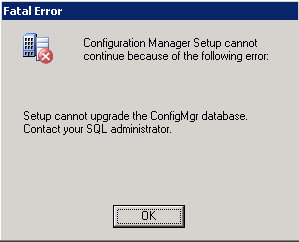 When I checked the ConfigMgrSetup.log file, I saw the following messages:
Upgrade database…
The database compatibility level for SMS_CC1 is 90
***SqlError: [08S01][11][Microsoft][ODBC SQL Server Driver][Shared Memory]General network error. Check your network documentation.
READ_COMMITTED_SNAPSHOT enabled.
***SqlError: [42000][5808][Microsoft][ODBC SQL Server Driver][SQL Server]Ad hoc update to system catalogs is not supported.
SqlExecute <if NOT EXISTS(select * from sys.configurations where name=’clr enabled’ and value_in_use=1) begin exec sp_configure ‘clr enabled’, 1 RECONFIGURE end >
FinalSqlOperations::Could not enable SQL CLR.
Setup cannot upgrade the ConfigMgr database. Contact your SQL administrator.
So…I searched on everything in those log entries and came up blank. Ad-hoc updates are enabled. Setup was successfully enabling SQL CLR. Something was still failing.
I finally came across this forum thread where a user stated that the problem in their environment was the SQL authentication mode. Now…I’ve always seen that message during the prereq check, but since it is a warning instead of an error, I have always ignored it…and have never had a problem until now. After changing the SQL authentication mode to be only “Windows Authentication”, the setup went through without a problem.
Out of Memory Error – Boot.ini 3GB Switch
Recently while working at a client I was installing the BITS 2.5 update for Server 2003 (as part of the prereqs for ConfigMgr), but when the server rebooted at the end of the update it essentially died. No more Remote Desktop connection…the server wasn’t even pingable. I didn’t have access to the client’s datacenter, so I was pretty much hamstrung until they could get me access to the console to look at the log files. Once I finally got to the server (booted into Safe Mode), the log files were chugging full of red. Some of the log entries were:
The Application log had the following (key messages in red):
Event ID: 4613
Description:
The COM+ Event System detected an unexpected error from a Win32 API call at line 917 of d:\nt\com\complus\src\events\tier2\notify.cpp. A call to PostThreadMessage failed with error code : "The operation completed successfully. "Event ID: 4613
Description:
The COM+ Event System detected an unexpected error from a Win32 API call at line 558 of d:\nt\com\complus\src\events\tier2\notify.cpp. A call to MsgWaitForMultipleObjects failed with error code 8: "Not enough storage is available to process this command. "Event ID: 8193
Computer: SERVERNAME
Description:
Volume Shadow Copy Service error: Unexpected error calling routine IEventSystem::Store. hr = 0x80040206.Event ID: 1508
Description:
Windows was unable to load the registry. This is often caused by insufficient memory or insufficient security rights.DETAIL – The system has attempted to load or restore a file into the registry, but the specified file is not in a registry file format. for C:\Documents and Settings\accountname\ntuser.dat
Event ID: 1502
Description:
Windows cannot load the locally stored profile. Possible causes of this error include insufficient security rights or a corrupt local profile. If this problem persists, contact your network administrator.DETAIL – The system has attempted to load or restore a file into the registry, but the specified file is not in a registry file format.
In the System Log was the following string of events:
Event Source: NtServicePack
Event ID: 4377
Description:
Windows Server 2003 Hotfix KB923845 was installed.Event ID: 1074
Description:
The process svchost.exe has initiated the restart of computer SERVERNAME on behalf of user NT AUTHORITY\SYSTEM for the following reason: No title for this reason could be found
Reason Code: 0x80070020
Shutdown Type: restart
Event ID: 3113
Description:
Initialization failed because the requested service redirector could not be started.Event ID: 2508
Description:
The server service was unable to load the server driver.Event Type: Information
Event Source: Application Popup
Event ID: 26
Description:
Application popup: wscript.exe – Application Error : The application failed to initialize properly (0xc0000142).Event Type: Information
Event Source: Application Popup
Event ID: 26
Description:
Application popup: : \SystemRoot\system32\DRIVERS\srv.sys failed to loadEvent Type: Error
Event Source: Application Popup
Event ID: 333
Description:
An I/O operation initiated by the Registry failed unrecoverably. The Registry could not read in, or write out, or flush, one of the files that contain the system’s image of the Registry.
The key messages above are the ones related to insufficient memory or “not enough storage”. Now this server has 12GB of RAM. That should not be a problem. Then I remembered an email from the client’s server team where they told me that they had set the /3GB switch in the boot.ini file. I did a little digging on that switch and came across articles here, here, here, here here and here.
Essentially it boils down to some common misunderstanding about what the 3GB switch does. The client has a requirement to use Server 2003 32-bit for this installation. Normally, 32-bit Windows operating systems have a 4GB RAM limit. Often people mistakenly believe that the /3GB switch expands the use of RAM above the 4GB limit. In actuality, the /PAE switch is used for this. Utilizing that switch Server 2003 Enterprise SP2 will then support 32GB of RAM. So…what does the /3GB switch do?
Paraphrasing one of the articles linked above, 32-bit Windows OSes implement a virtual memory space that is limited to 4GB. Normally this is split into two sections…2GB for Kernel and 2GB for User-mode processes. The /3GB switch makes 3GB available for user-mode processes, but leaves only 1GB available for Kernel.
This appears to be exactly what happened. Because the 3GB switch was set and only 1GB was available for kernel operations, the system essentially ran out of memory for completing the installation of BITS. Once I removed the 3GB switch (and left the PAE switch intact) and rebooted the system, it came back up.
Speaking at MNSCUG.ORG
Don’t know why I didn’t think to post this earlier, but I am speaking at the Minnesota System Center User Group (MNSCUG.ORG) this week. I will be talking about Operating System Deployment with ConfigMgr, and addressing some of the particular gotchas to look out for with Windows 7 deployments.
If you are in the Twin Cities, come check out the user group. We’d love to have you.
The meeting is tomorrow (11/18) at the Microsoft office in Bloomington. Food and beverages arrive at 4:30, and the meeting starts at 5:00. We should end around 7:30 or so. There will be some nice door prizes including two copies of the MMS 2009 post conference DVDs…but to be eligible for the door prizes (and to help us plan for food) you must register at the link below. Hope to see you there!
Interview with Mikael Nystrom (Part 1 of 2)
While at TechEd North America earlier this year, I had the pleasure of interviewing Mikael Nystrom from TrueSec. I knew very little about Mikael before sitting down with him, and it ended up being a very fun interview. It also ended up being over an hour long! Below is the first half of the interview. Enjoy!
Just a note…the interviews from TechEd have been taking me a long time to post…mainly because of my frustration with some glitches with my blog host. I have had significant issues getting the audio to work. I have uploaded the audio in the format that is required by the audio player, but the player won’t play the audio. The previous interviews have each taken multiple hours to get the technical glitches worked out. This time I simply gave up on resolving the issues and produced a “video” from the audio and the one picture I have of me with Mikael at TechEd.
Office 2007 Install Issue
Erik sent the following question re: a special issue with installing Office 2007.
We are in the process of trying to push out office 2007 w/SP2 w/o Access and Publisher and for it to uninstall Outlook 2003, but leave everything else and for it to do it unattended and silent. Now I did create the .MSP file which does this and it works great, but before our company decided to do this in an organized way, they were giving Excel 2007 out for people to try or people don’t have SP2 for Office 2007. Now I have tried everything to create an SMS package (SMS 2003) that will work, but if I just send out the package with the .MSP file it prompts people to interact with it if they already have anything part of Office 2007 on their computer. Now we created a package in sms that will uninstall office 2007, and it’s linked to another package in sms to reinstall office 2007, but it wants a restart on the computer before it will reinstall office 2007. Now if you guys know a way that will work without uninstalling office 2007 first that great too. I’ll take an ideals at this moment.
You do have an interesting problem. Because your company chose to give out part of Office 2007 before the full deployment was packaged and prepared, you will likely have some careful steps to take for those computers.
One way to handle that would be to create a collection to locate the users that have Excel 2007 already installed. From your description, it sounds like those are the only ones that won’t install silently at this point. You may need to communicate with those users to prepare them that a reboot will be required as part of this install. If you send this as a non-mandatory advertisement, they can choose when to do the installation at a time when a reboot won’t affect them as much. I would tell them to just plan to run it when they leave for lunch.
Without building out a similar scenario in my demo environment to test it, I don’t know offhand of a way to do this without uninstalling Excel first. I’m actually a bit surprised that the installation that you made silent still asked for user input. Did you follow my instructions in this post?
SQL Server Version Numbers
This morning I have been building out a new ConfigMgr demo environment on my laptop based on Server 2008 R2. I had already installed SQL 2008, but couldn’t remember if I had installed SP1 for SQL 2008 or not. I looked at the version number, but then had to go to Microsoft to find out what the version number equated to in terms of SP level. For future reference to myself and others, here is a concise list of SQL Server version numbers and the corresponding friendly name. This will be useful if you already know the version number. If you need to know how to get the version number from you SQL server, refer to this page (which is where this list of numbers came from). That page lists the SQL queries for each version to perform to obtain the version number.
| SQL Version | Version Number |
| SQL Server 2008 RTM | 2007.100.1600.0 |
| SQL Server 2008 SP1 | 2007.100.2531.0 |
| SQL Server 2005 RTM | 2005.90.1399 |
| SQL Server 2005 SP1 | 2005.90.2047 |
| SQL Server 2005 SP2 | 2005.90.3042 |
| SQL Server 2005 SP3 | 2005.90.4035 |
| SQL Server 2000 RTM | 2000.80.194.0 |
| SQL Server 2000 SP1 | 2000.80.384.0 |
| SQL Server 2000 SP2 | 2000.80.534.0 |
| SQL Server 2000 SP3 | 2000.80.760.0 |
| SQL Server 2000 SP3a | 2000.80.760.0 |
| SQL Server 2000 SP4 | 2000.8.00.2039 |
| SQL Server 7.0 RTM | 7.00.623 |
| SQL Server 7.0 SP1 | 7.00.699 |
| SQL Server 7.0 SP2 | 7.00.842 |
| SQL Server 7.0 SP3 | 7.00.961 |
| SQL Server 7.0 SP4 | 7.00.1063 |
| SQL Server 6.5 RTM | 6.50.201 |
| SQL Server 6.5 SP1 | 6.50.213 |
| SQL Server 6.5 SP2 | 6.50.240 |
| SQL Server 6.5 SP3 | 6.50.258 |
| SQL Server 6.5 SP4 | 6.50.281 |
| SQL Server 6.5 SP5 | 6.50.415 |
| SQL Server 6.5 SP5a | 6.50.416 |
| SQL Server 6.5 SP5a Update | 6.50.479 |
Modena Tools (OSD Tools and Driver Sync)
I got an email from a friend a while back tipping me off to some OSD tools in development by Microsoft that I hadn’t heard about. The codename of the project is Modena. It is currently in beta and can be found on the Connect site.
So…what is Modena? From the Cravings of OSD blog…
Modena is a “collection” of tools aimed at simplifying your deployment tasks when using Configuration Manager 2007 Service Pack 2. … Modena, with OSD Tools and Driver Sync, includes the blueprint we use at Microsoft to deploy Windows 7. We provide our end-user experience, exported task sequence, pre-flight scripts, and our driver sync tool to simplify management of drivers in your enterprise.
I have not been able to install them in my demo environment to test them out yet (hope to do so this week), but from what I could read about so far…I’m pretty excited about what I saw. It appears to be a pretty comprehensive “Front End” to the OSD process along with a tool to simplify the driver management component of your OS deployment. Being that those two components are where a lot of companies tend to have the most issues in the OSD process…this is a welcome addition to the OSD toolbox.
You can read more about what is included in Modena in a fairly expansive blog post on the “Cravings” blog.
ConfigMgr SP2 Availability
Today I saw some confusion about when SP2 for ConfigMgr will be available. Everyone agrees that the release is 90 days after Windows 7, what they don’t agree on is whether the Windows 7 date is the RTM (Release to Manufacturing) date or the GA (General Availability). Since RTM was July 22, and GA is October 22, this is an important distinction. So which is it?
What was announced at the Microsoft Management Summit, and has been re-confirmed since is that SP2 will be released within 90 days of the Windows 7 RTM. So…that would mean that we will hopefully be able to get our hands on ConfigMgr SP2 within the next couple of weeks.
ConfigMgr Upgrade / Migration Planning
Just a note to those who are moving to ConfigMgr from SMS 2003 (or earlier). Take the time to properly architect the ConfigMgr implementation…don’t just upgrade the existing infrastructure without re-thinking the design to ensure it makes sense for your business. There have been enough changes in scalability (and much more) that your existing architecture may not make sense with ConfigMgr…you could be wasting money on servers/licenses/administration by just keeping the same structure.
Example: I’ve been working with a client over the last week on an SMS 2003 to ConfigMgr migration. When I looked at their existing SMS 2003 infrastructure, it included a Central Site, four Primaries, and 26 Secondaries. The Central and all four primaries are in the same physical location. There are about 8000 clients. If I moved that design to ConfigMgr, it would just be overkill…and a serious waste of money for the client.
Turns out that the client’s SMS 2003 infrastructure was a direct upgrade from SMS 2.0 a long time ago. Personally, I never worked with SMS 2.0, so I don’t know if that was well designed or over designed. What I do know is that the ConfigMgr environment that I designed for them is significantly simpler. They save a ton on licensing, and it will be significantly easier to manage…along with providing them the flexibility that they need for any future expansion.
How to Create a Bootable USB Key
Last week I needed to boot to ConfigMgr Task Sequence bootable media on a machine that I didn’t have a CD/DVD drive for. PXE isn’t enabled in this environment, and I was under a tight timeframe to get it done…I needed to create a bootable USB key fast. I remember trying to use the ConfigMgr wizard to create a bootable usb key last year, but for some reason I couldn’t get it to work. Because of that experience, I instead pursued taking my existing bootable ISO and creating a bootable USB key from that. I came across instructions that are posted several places on the internet…mostly in forums. Unfortunately no one has posted where the original instructions came from. I’d love to give credit to that person because they really helped me out last week. I’m posting them here as a help to others…and so that I will always have an easy way to find the instructions the next time I need them! I’ve also modified the original quoted instructions to be more specific to the bootable ISO scenario.
Insert your USB flash drive and enter the following commands at a command prompt:
diskpart
list diskNote: Confirm which disk is the USB drive. The instructions below assume that your USB flash drive will be seen as disk 2. If you select the wrong disk you will wipe the wrong drive…possibly your hard drive.
select disk 2
clean
create partition primary
select partition 1
active
format fs=fat32 quick
assign
exitThe final step is to copy the files from the bootable ISO to the USB key. Mount the ISO using a program such as Virtual CloneDrive. Use Xcopy to copy the files from the ISO to the USB key. The command line below assumes that D: is the drive letter where the bootable ISO is mounted and E: is the drive letter for the USB key.
xcopy d:\*.* /e/f e:\
MN System Center User Group – President
Tonight was the monthly meeting for the Minnesota System Center User Group (miscusergroup.org – long story behind the URL MNSCUG.ORG). We had John Vintzel from the ConfigMgr product team talking about some of the features that will be in the R3 release…good stuff.
A few weeks ago my friend Tim approached me to ask me if I would consider running for President of the user group. I was honored to be asked and said yes. Tonight I was elected to be President of the user group! That’s really really cool, and I’m looking forward to trying to get some good programs on the agenda for the meetings over the next year.
BTW…if you are interested, the next meeting will be October 15th at the Microsoft office in Bloomington. Check the user group website above for more information.
Error Creating MDT Boot Image
First of all, I’ll admit that this post is a bit of a stupid mistake. It stems from a miscommunication between a co-worker and I who were working on an internal (not client) server. I should have confirmed what he had done instead of assuming.
We have been building a new ConfigMgr server. My co-worker had some time while I was working on a client project, so he installed ConfigMgr.
This morning I started building out the rest of the server for OSD purposes. After configuring the MDT integration with ConfigMgr, I went into the ConfigMgr console to “Create Boot Image using Microsoft Deployment”. After entering in all the info it asked for, the wizard started but fairly quickly popped up an error stating, “Error while importing Microsoft Deployment Toolkit Task Sequence. Details: The ConfigMgr Provider reported an error.” When I checked the log file (located in C:\Users\<username>\AppData\Local\Temp\2\NewBootImage_x86.log), I found the following error:
PEIMG failed to use the servicing stack shim library (ssshim.dll) to locate a servicing stack that matches the target image (0x901f0005).
Hmmm…that sounds like a WAIK issue. After looking, I confirmed that my co-worker had installed the previous version of WAIK instead of the version for Windows 7/Server 2008 R2. So, I removed the old version and installed the new WAIK. Got a different error. Unfortunately I didn’t take note of what the error message was at the time, but I do remember that the SMS Provider log file (smsprov.log) had the following phrases in a couple of error entries (I know this because of my bing.com search history.)
failed to get the peimg tool installation location
failed to get peimage command line
That sent me hunting for more info and finally led me to ask the question…”What version of ConfigMgr did my co-worker install?” After checking the version, I discovered that we had somehow miscommunicated. I thought he had installed the Release Candidate of ConfigMgr SP2 (because I am doing Windows 7 deployments…SP2 is required for this). Turns out he had installed SP1.
So…after installing both R2 and SP2, I was finally able to create the boot image using the MDT integration.
Perhaps someone searching on the above search strings will see this and be able to get back up and going faster than I did!
ConfigMgr SP2 Version Number
Just a quick post…I updated my earlier post about ConfigMgr Version Numbers to reflect the ConfigMgr SP2 (RC) version number.
If the version number changes any further for the final release of SP2 from the RC release, I will post that info when I have it.
Note: This version number did change with the final release. The post linked above has been updated to reflect this.
Free OSD and Windows 7 Seminar
At the end of this month I will be leading a free half day technical seminar on Operating System Deployment at New Horizons in Edina MN. I will be doing a version of the Operating System Deployment session that I delivered at MMS and TechEd this year along with talking about Windows 7 deployment. The Windows 7 component will be relaying the experience that I have gained in deploying Windows 7 internally at Virteva using ConfigMgr.
The seminar will be on September 30 from 9:00-11:30am Central Time. It will be offered for both in classroom as well as remote attendees, so you can attend even if you can’t make it to Edina that day. If you would like to attend, you can register at the New Horizons site. When you sign up, there will be a question asking “How did you hear about us?” at the bottom of the registration form. Please answer “Other” and put “verbalprocessor.com” in the “Other” field.
I look forward to seeing you there!
Rod Trent Interview – Part 1
As I promised last week, here is the first of a two part interview with Rod Trent that took place the last night of MMS 2009. I hope to post part 2 sometime next week. Enjoy!
System Center Roadmap
Last week at MMS in Las Vegas, Microsoft announced the general timeline for next versions of products in the System Center suite. For those who were not able to come to MMS, here is the slide from the second keynote laying out that roadmap.
ConfigMgr Front End HTA
During my session at MMS (and upcoming at TechEd) I used a Front End HTA and a back end VBS during my deployment demo. I mentioned that I would make them available for download (and have gotten multiple requests for this). Hope these help someone else out there!
Links from my MMS Session
Just finished my MMS session a while ago. Had a really fun time with it and felt like it went really well. Had a good time interacting with some of the attendees both before and after the session. In the session I promised a list of links that I referred to during the time. Some are on my blog, some are elsewhere.
By request, I will be posting the task sequence demo videos later…I want to do a voice over of the videos to make them more valuable. I will also be posting my Front End HTA and Back End VBS script later. I will update my post after doing so.
I think all of the links that I referred to that are on my blog are also on the My Favorite Ramblings page, so I will just link to that one. This includes the “Run a CMD Prompt as System” post that I referred to. Just scroll down past the personal section to the “ConfigMgr” section.
The “ConfigMgr Child Labor” video:
https://verbalprocessor.com/2009/04/29/configmgr-child-labor-video/
Johan’s blog and specific posts:
Johan’s post on Device Driver management
Michael Niehaus’s blog.
Deployment Guys blog.
TechNet forum.
myITforum.com ConfigMgr forum.
ConfigMgr Child Labor Video
This is the follow up to the video that was shown at MMS 2008 showing my five year old daughter deploying systems using ConfigMgr. I used this during the intro to my “Operating System Deployment in the Real World” session at MMS 2009.

Subscribe
Recent Comments
-


 The Realm of the Verbal Processor