Interview with Wally Mead – Part 3 of 3
 Without further ado, here is the final part of the interview with Wally Mead. A lot of you have enjoyed this series, and I’ve been glad to be able to bring it to you.
Be sure to check back soon for the next interview. I’m not sure which one will be next, but I’ve already lined up two guys in the SMS community that I know you won’t want to miss.
Yeah, that’s meant to be a teaser. It’s my blog…I can do that! :-)
So, enjoy Part 3 of the Wally interview and check back soon to find out who my next interview is going to be!
Fail Open Goat
Yesterday Rod Trent linked to an article on Robert Hensing’s blog about a less than well researched article in USA Today about Firefox 3. When I went to the site, I saw Robert’s blog’s tag line…”Home of the ‘Fail Open Goat’ Award”. That got me curious, so I searched his blog to find out what it was about. That brought me to this page on Robert’s blog.
There is a breed of goats called myotonic goats. They have a genetic abnormality that causes their muscles to lock up when they are frightened, startled, or excited. The effect it has is that their legs get stiff, and they typically fall over on their sides. They recover after a few seconds and everything is normal…until they are startled or excited again. It’s actually pretty funny to watch.
To quote Robert on his blog, “I call them “fail open goats” because, well, that’s what it reminds me of whenever I see one . . . a goat . . . failing . .. open.” He created the “Fail Open Goat” award to acknowledge instances of product security failure.
All last night and after waking up this morning, I am walking around chuckling at the phrase, “a goat…failing…open.” I just can’t stop laughing about it. So…watch the video below, and think about that phrase every time one falls over…especially when the entire herd falls over after having an umbrella waved at them. You just might start walking around muttering “a goat…failing…open”.
MP not responding to HTTP requests – fixed
I have been more than a bit annoyed with the MP on my SCCM server. I have SCCM SP1 running on Server 2008. It is also using a remote SQL server that is running on Server 2003 x64 edition. In looking at the component status, it shows up as a fat red X. Looking further in, the problem is on the SMS_MP_CONTROL_MANAGER component. Every 60 minutes I have a message that comes up in that component stating:
MP Control Manager detected MP is not responding to HTTP requests. The http error is 12029.
Interview with Wally Mead – Part 2 of 3
 Here is part two of my interview with Wally Mead. This section is a bit shorter than the first one…in the flow of the questions this just seemed like the best place to break it up. I plan to post the third and final part of the interview next Tuesday, so be sure to check back for the final ten minutes.
My plan is to do some more of these personal type interviews, so I posed a question yesterday…who would you like to see interviewed? Joey started off a fantastic list of people. (He also emailed me offline saying that he would be impressed if I got his whole list…heck…I’ll be impressed if I get half of his list! Although I do already have one of those lined up!) I’d love to hear from you who you would like to know more about. So…go to the post and leave a comment voting for who you would like. If the person is already mentioned, feel free to throw in another vote for them.
But…without further rambling by me…heeeeeeeerree’sss Wally!
SCCM SP1 and Itanium – NOT supported
Back in October 2007 when I was doing my original Pilot deployment of SCCM (RTM), I posted on the TechNet forums asking questions about whether putting the site database on a SQL cluster that was running on the Itanium (IA64) architecture was a supported installation scenario. Stan White replied back that both clustered as well as Itanium were supported. After installing, everything was working fine…no problems worth mentioning.
Fast forward seven months. I’m in the midst of my SCCM rebuild. I’m doing so on Server 2008 and SCCM SP1. Everything appeared to be working except that the SMS_SITE_SQL_BACKUP component refused to install on the SQL server. In the sitecomp.log file was the following message (only three lines out of a couple of hundred log entries):
Who would you like to see interviewed?
Based solely on the number of hits that the Wally Mead interview has gotten, I would say that the SMS/SCCM community has a fair amount of interest in getting to know more about some of the people that we see on the forums or presenting at conferences. So…who would you like to see interviewed?
Leave a comment below to let me know who you’d like to hear from. If someone has already mentioned someone that you are interested in, leave a comment anyway…let it be like adding a vote. Don’t know if I will be able to make an interview happen with those that you are interested in hearing from, but I’ll do my best. Just give me ideas of who you are interested in getting to know.
Oh yeah, I will be working on cleaning up the second part of the Wally interview and hopefully posting it later this week. Check back to hear it…or subscribe to my RSS feed to be automatically alerted.
Interview with Wally Mead – Part 1
Over the last several months I’ve developed a relationship with Wally Mead. Wally is a Senior Program Manager at Microsoft where he works with the System Center Configuration Manager product team. He handled a bug report that I submitted about SCCM (here and here…bug was fixed in SP1) and we connected offline afterwards. He had seen in the bug submission that I work for Campus Crusade for Christ, and he has had interaction with CCC in the past.
This week Wally has been in Orlando at Tech-Ed, so I invited him to come out and let me take him on a tour of CCC’s headquarters. After the tour we sat down and Wally allowed me to interview him. Below is the first portion of the interview. I will post parts 2 and 3 sometime next week.
I’d like to also offer a public thank you to Wally for taking the time to sit down with me. It was a very enjoyable time, and if Chris ends up coming to UCF, I look forward to seeing you more often!
Another thing…who else would you like to see interviewed? Let me know on that page and I’ll see what I can do.
Enjoy!
Part 2 of the interview is live now…
[Update 6-22-08: It was brought to my attention in the comments below that if you don’t have the Adobe Flash Plugin on your computer, you will not see the audio player that is just below the “Enjoy!” line. You can get it here if you don’t already have it.]
Ultrasound Pics
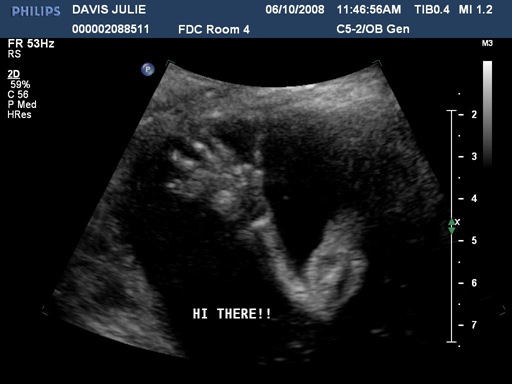
We went in for our first ultrasound today. It was a fun experience getting to see our first glimpses of the little life that is growing inside Julie’s belly. The ultrasound equipment at Winnie Palmer hospital is much better than when we had ultrasounds with our two daughters. But that was several years ago also. Seeing our baby’s little fingers, arms, heartbeat and all of the movements was a really neat experience. We also found out that we are having a little boy! We were all kinda hoping for that. Laurel and Marybeth were running around quoting a line from “Lady and the Tramp“…”Oh boy, it’s a boy! Oh boy, it’s a boy! Oh boy, it’s a boy!”
This also serves as the complete answer to my youngest daughter’s prayers. Back before we got pregnant…and keep in mind that we were not planning to have a third child at the time…Marybeth prayed for a brother. I don’t know what it is about that child praying…but God seems to do backflips whenever she prays. She not only prayed us pregnant…she prayed herself a brother. (And yes…when she later started talking about twins…we both cringed.)
So…what does our baby look like now? Here are the five pics the hospital gave us (three are after the break). Also…if you don’t want to see the proof of “boyhood”, avoid the last picture.

Print Server Migration
We have been doing a migration from an older print server to a new one. I worked with the print server administrator to write a script that would make it easier to migrate workstations over to the new server. He had already duplicated the printer shares from the old server to the new one. We just needed a way to point the workstations to the new server. Here is what we wanted the script to do:
- read all network printers into an array
- read default printer into a variable
- delete all network printers that start with \\OldPrintServer
- add back all of the printers in the network printers array but use \\NewPrintServer as the servername
- If the original default printer was a network printer…set it back to that same name on the new server.
Here is what I came up with. There may be issues with line wrapping below. It is also available for download.
‘***********************************************************
‘***********************************************************
‘ Print Server Migration Script
‘
‘ Author: Jarvis Davis
‘ Company: Campus Crusade for Christ
‘ Creation Date: May 29, 2008
‘
‘ Purpose: To migrate workstations from one print server to another
‘ while maintaining the same printer names and default printer.
‘
‘ Assumption: This is assuming that you have already migrated the printer
‘ objects from one print server to another, and that the printer
‘ share names have stayed the same.
‘
‘***********************************************************
‘ General Flow:
‘ * read all network printers into an array
SCCM and WSUS on Server 2008
As part of my reinstall of my SCCM server, I have been beating on a problem for way longer than I should have…and finally got it fixed. It is related to SCCM not being able to sync with WSUS. Background: we are a small environment by SMS/SCCM standards, so we are able to work quite well with all components on the same server. The only thing that is external to “the” SCCM box is that we have SQL off-box.
When I set up WSUS/SCCM as the documentation recommended, I got some crazy errors. I have posted the relevant sections below. The key portion of the wsyncmgr.log was:
Sync failed: WSUS server not configured. Source: CWSyncMgr::DoSync
Having dealt with a similar issue before, I was pretty sure that the errors has something to do with the way that SCCM connects as Local System and the internet settings associated with the System account. In particular I had dealt with a proxy issue before that was causing similar errors. In doing my research on the problem I came across a couple of posts that proved helpful. In this one, a Microsoft guy posted that two ways to fix this were to either run IE as Local System or to use the ProxyCfg.exe tool (Server 2003). I’m on Server 2008, so I found another post that showed how to do the proxycfg stuff in Server 2008 using netsh. After doing the second option (netsh), everything looked good as far as the proxy was concerned…it wasn’t using a proxy. That wasn’t the problem.
So…what about starting IE as Local System and looking at those settings? I’ve posted before about how to run an app as Local System. The Vista option in that post works on Server 2008.
Once I did that, I went into IE settings and drilled down through Tools | Internet Options | Connections | LAN Settings. The checkbox for “Automatically detect settings” was checked. I unchecked that box. Just for good measure I rebooted. That was probably not necessary, but I wanted to see the process start fresh after a reboot…easier to track in the log files.
Once that took effect and I triggered a synchronization, SCCM was able to sync with WSUS. Matter of fact…it is still synchronizing as I finish typing up this post. All because of a stupid little checkbox.
>>>>>>>>> Relevant Log Files <<<<<<<<<
In the WCM.log file…something is definitely not right:
System.Net.WebException: The underlying connection was closed: An unexpected error occurred on a receive. —> System.IO.IOException: Unable to read data from the transport connection: An existing connection was forcibly closed by the remote host. —> System.Net.Sockets.SocketException: An existing connection was forcibly closed by the remote host~~ at System.Net.Sockets.Socket.Receive(Byte[] buffer, Int32 offset, Int32 size, SocketFlags socketFlags)~~ at System.Net.Sockets.NetworkStream.Read(Byte[] buffer, Int32 offset, Int32 size)~~ — End of inner exception stack trace —~~ at System.Net.Sockets.NetworkStream.Read(Byte[] buffer, Int32 offset, Int32 size)~~ at System.Net.PooledStream.Read(Byte[] buffer, Int32 offset, Int32 size)~~ at System.Net.Connection.SyncRead(HttpWebRequest request, Boolean userRetrievedStream, Boolean probeRead)~~ — End of inner exception stack trace —~~ at Microsoft.UpdateServices.Administration.AdminProxy.CreateUpdateServer(Object[] args)~~ at Microsoft.UpdateServices.Administration.AdminProxy.GetUpdateServer(String serverName, Boolean useSecureConnection, Int32 portNumber)~~ at Microsoft.SystemsManagementServer.WSUS.WSUSServer.ConnectToWSUSServer(String ServerName, Boolean UseSSL, Int32 PortNumber)
Remote configuration failed on WSUS Server.
In the WSUSctrl.log were these entries which seemed to indicate that SCCM was configured correctly to talk to WSUS.
Found WSUS Admin dll of assembly version Microsoft.UpdateServices.Administration, Version…
Found WSUS Admin dll of assembly version Microsoft.UpdateServices.Administration, Version…
Found WSUS Admin dll of assembly version Microsoft.UpdateServices.Administration, Version…
The installed WSUS build has the valid and supported WSUS Administration DLL assembly version …
Successfully connected to local WSUS server
Local WSUS Server Proxy settings are correctly configured as Proxy Name and Proxy Port 80
Successfully connected to local WSUS server
There are no unhealthy WSUS Server components on WSUS Server SCCMserver
Successfully checked database connection on WSUS server SCCMserver
Then in the wsyncmgr.log there is this failure when SCCM tries to run a synchronization:
Performing sync on retry schedule
STATMSG: ID=6701 SEV=I LEV=M SOURCE=”SMS Server” COMP=”SMS_WSUS_SYNC_MANAGER” SYS=SCCMserver SITE=SITEcode ….
Sync failed: WSUS server not configured. Source: CWSyncMgr::DoSync
STATMSG: ID=6703 SEV=E LEV=M SOURCE=”SMS Server” COMP=”SMS_WSUS_SYNC_MANAGER” SYS=SCCMserver SITE=SITEcode PID=1212 TID=2992 GMTDATE=Tue Jun 03 17:52:14.874 2008 ISTR0=”CWSyncMgr::DoSync” ISTR1=”WSUS server not configured” …
Sync failed. Will retry in 60 minutes
Sync time: 0d00h05m00s
Waiting 60 minutes for requests…
In the IIS log for WSUS:
#Fields: date time s-ip cs-method cs-uri-stem cs-uri-query s-port cs-username c-ip cs(User-Agent) sc-status sc-substatus sc-win32-status time-taken
2008-06-03 17:47:30 IPofSCCMserver POST /ApiRemoting30/WebService.asmx – 8530 – IPofSCCMserver Mozilla/4.0+(compatible;+MSIE+6.0;+MS+Web+Services+Client+Protocol+2.0.50727.1434) 401 2 5 7888
2008-06-03 17:47:32 IPofSCCMserver POST /ApiRemoting30/WebService.asmx – 8530 DOMAIN\SCCMserver$ IPofSCCMserver Mozilla/4.0+(compatible;+MSIE+6.0;+MS+Web+Services+Client+Protocol+2.0.50727.1434) 200 0 0 1886
2008-06-03 17:47:32 IPofSCCMserver POST /ApiRemoting30/WebService.asmx – 8530 DOMAIN\SCCMserver$ IPofSCCMserver Mozilla/4.0+(compatible;+MSIE+6.0;+MS+Web+Services+Client+Protocol+2.0.50727.1434) 200 0 0 405
2008-06-03 17:47:32 IPofSCCMserver POST /ApiRemoting30/WebService.asmx – 8530 DOMAIN\SCCMserver$ IPofSCCMserver Mozilla/4.0+(compatible;+MSIE+6.0;+MS+Web+Services+Client+Protocol+2.0.50727.1434) 200 0 0 15
2008-06-03 17:47:32 IPofSCCMserver POST /ApiRemoting30/WebService.asmx – 8530 DOMAIN\SCCMserver$ IPofSCCMserver Mozilla/4.0+(compatible;+MSIE+6.0;+MS+Web+Services+Client+Protocol+2.0.50727.1434) 200 0 0 62
2008-06-03 17:47:32 IPofSCCMserver POST /ApiRemoting30/WebService.asmx – 8530 DOMAIN\SCCMserver$ IPofSCCMserver Mozilla/4.0+(compatible;+MSIE+6.0;+MS+Web+Services+Client+Protocol+2.0.50727.1434) 200 0 0 0
2008-06-03 17:47:32 IPofSCCMserver POST /ApiRemoting30/WebService.asmx – 8530 DOMAIN\SCCMserver$ IPofSCCMserver Mozilla/4.0+(compatible;+MSIE+6.0;+MS+Web+Services+Client+Protocol+2.0.50727.1434) 200 0 0 15
2008-06-03 17:47:32 IPofSCCMserver POST /ApiRemoting30/WebService.asmx – 8530 DOMAIN\SCCMserver$ IPofSCCMserver Mozilla/4.0+(compatible;+MSIE+6.0;+MS+Web+Services+Client+Protocol+2.0.50727.1434) 200 0 0 0
2008-06-03 17:47:32 IPofSCCMserver POST /ApiRemoting30/WebService.asmx – 8530 DOMAIN\SCCMserver$ IPofSCCMserver Mozilla/4.0+(compatible;+MSIE+6.0;+MS+Web+Services+Client+Protocol+2.0.50727.1434) 200 0 0 15
2008-06-03 17:47:32 IPofSCCMserver POST /ApiRemoting30/WebService.asmx – 8530 DOMAIN\SCCMserver$ IPofSCCMserver Mozilla/4.0+(compatible;+MSIE+6.0;+MS+Web+Services+Client+Protocol+2.0.50727.1434) 200 0 0 0
2008-06-03 17:47:32 IPofSCCMserver POST /ApiRemoting30/WebService.asmx – 8530 DOMAIN\SCCMserver$ IPofSCCMserver Mozilla/4.0+(compatible;+MSIE+6.0;+MS+Web+Services+Client+Protocol+2.0.50727.1434) 200 0 0 15
2008-06-03 17:47:32 IPofSCCMserver POST /ApiRemoting30/WebService.asmx – 8530 DOMAIN\SCCMserver$ IPofSCCMserver Mozilla/4.0+(compatible;+MSIE+6.0;+MS+Web+Services+Client+Protocol+2.0.50727.1434) 200 0 0 15
2008-06-03 17:47:32 IPofSCCMserver POST /ApiRemoting30/WebService.asmx – 8530 DOMAIN\SCCMserver$ IPofSCCMserver Mozilla/4.0+(compatible;+MSIE+6.0;+MS+Web+Services+Client+Protocol+2.0.50727.1434) 200 0 0 0
2008-06-03 17:47:32 IPofSCCMserver POST /ApiRemoting30/WebService.asmx – 8530 DOMAIN\SCCMserver$ IPofSCCMserver Mozilla/4.0+(compatible;+MSIE+6.0;+MS+Web+Services+Client+Protocol+2.0.50727.1434) 200 0 0 15
2008-06-03 17:49:20 IPofSCCMserver POST /reportingwebservice/reportingwebservice.asmx – 8530 – IPofSCCMserver Mozilla/4.0+(compatible;+MSIE+6.0;+MS+Web+Services+Client+Protocol+2.0.50727.1434) 200 0 0 5565
2008-06-03 17:49:21 IPofSCCMserver POST /ApiRemoting30/WebService.asmx – 8530 – IPofSCCMserver Mozilla/4.0+(compatible;+MSIE+6.0;+MS+Web+Services+Client+Protocol+2.0.50727.1434) 401 2 5 15
2008-06-03 17:49:21 IPofSCCMserver POST /ApiRemoting30/WebService.asmx – 8530 DOMAIN\SCCMserver$ IPofSCCMserver Mozilla/4.0+(compatible;+MSIE+6.0;+MS+Web+Services+Client+Protocol+2.0.50727.1434) 200 0 0 15
2008-06-03 17:49:24 IPofSCCMserver POST /ServerSyncWebService/serversyncwebservice.asmx – 8530 – IPofSCCMserver Mozilla/4.0+(compatible;+MSIE+6.0;+MS+Web+Services+Client+Protocol+2.0.50727.1434) 200 0 0 2198
2008-06-03 17:49:25 IPofSCCMserver POST /ClientWebService/Client.asmx – 8530 – IPofSCCMserver Mozilla/4.0+(compatible;+MSIE+6.0;+MS+Web+Services+Client+Protocol+2.0.50727.1434) 200 0 0 810
2008-06-03 17:49:25 IPofSCCMserver POST /SimpleAuthWebService/SimpleAuth.asmx – 8530 – IPofSCCMserver Mozilla/4.0+(compatible;+MSIE+6.0;+MS+Web+Services+Client+Protocol+2.0.50727.1434) 200 0 0 763
2008-06-03 17:49:27 IPofSCCMserver POST /DssAuthWebService/DssAuthWebService.asmx – 8530 – IPofSCCMserver Mozilla/4.0+(compatible;+MSIE+6.0;+MS+Web+Services+Client+Protocol+2.0.50727.1434) 200 0 0 654
Password Complexity
This morning I got an email from someone about secure passwords. The email was a link to this article. Before even opening the link I had a good idea of what it was going to say…make your passwords use all four character sets and make them random, but base it on a phrase that you can easily remember. My guess (and I was correct) was that it was going to ignore/gloss over the issue of password length.
In years past I was a strong proponent of passwords that used all four character sets (UPPERCASE, lowercase, 12345, !@#$%^%). I’m really not anymore. Reason being that password length has a much greater effect on whether a password can be cracked than does complexity. One of the best articles I have seen on this issue was an InfoWorld article back in 2006. The author did a great job of mathematically showing how the two factors in password complexity (length and number of possible characters) work together.
In the times that I have done password audits for the ministry I work for, this has proven out every time. I have seen some very complex passwords that were shorter in length get cracked. I have never cracked a long password. That is the primary reason that my non-admin password is currently 20+ characters long. The password for my admin account? Somewhere north of 30 characters. Good luck cracking it while I am still alive.
A few paragraphs from the InfoWorld article above that I most enjoyed…:
For everyone using six- to nine-character passwords with “complexity,” I appreciate it. I get paid to break in to systems for a living, and you make my job easier.
Strength is provided by increasing the number of possible passwords the attacker has to guess (let’s call this the keyspace even though it really isn’t appropriate in this context). The keyspace is represented mathematically as X^L, where X is the number of possible characters that can be in the password and L is the length. If you do the basic analysis, you can see that changes in L are more significant, character for character, than changes in X.
~~~~
And because most users also use dictionary words as the root to their “complex” password, and follow other common conventions (capitalized letters are at the beginning, numbers are at the end), a simple hybrid attack will break most of them in less than a day. Trust me, I know — I do it for a living.
~~~~
So, when trying to increase the strength of your passwords, my advice is to consider length as much or more than you consider complexity. For my money, length is all the protection I need. Make your admin and root passwords 15 or more characters long and forget about complexity — at 15 characters-plus, they are all but uncrackable.
Applicationhost.config – not well formed XML Problems
On Friday I was troubleshooting an issue on our SCCM server related to updating a package on a Distribution Point. It kept failing with errors like the following:
2302 “SMS Distribution Manager failed to process package “”Random App”” (package ID = ABC00003).” Possible cause: …
2342 “SMS Distribution Manager is starting to distribute package “”Random App”” to distribution point “”[“”Display=\\SCCMServer\””]MSWNET:[“”SMS_SITE=ABC””]\\SCCMServer\””.”
2300 “SMS Distribution Manager is beginning to process package “”Random App”” (package ID = ABC00003).”
30125 “User “”domain\user”” added new distribution points to a package named “”Random”” (ABC00003).”
After digging around for a while I came to discover that the IIS services had failed to start. When I tried to start the IIS service, I got the lovely message that applicationhost.config is not well-formed XML. Now…that file on my server is over 1000 lines long. I don’t know if it is well formed or not. So…I hit Google and came across a page talking about an issue where that file will get corrupted if you are using either OneCare or Forefront Client Security as your anti-virus software. I’m using FCS on my server.
The workaround listed on that page is:
Create the following key “HKEY_LOCAL_MACHINE\SYSTEM\CurrentControlSet\Services\MpFilter\Parameters” . Add a DWORD value “ScanOnCleanup” and set it to 0. Restart OneCare/Forefront service.
I did the above workaround, but what about the corrupted applicationhost.config? I took a gamble…perhaps the file is corrupted, but the text is intact. I simply opened the applicationhost.config file in EditPlus, saved it as a new file, and copied the new file to the proper location.
IIS Started. SCCM distributed the package. I went home happy.
Fantasy NASCAR – Monster Day
I’m in a Fantasy NASCAR league with a couple of guys. In this league you pick four drivers for each race…one from an A list, two from a B list, and one from a C list. You get points based on how the drivers do in qualifying and the race. You also can only start a driver nine times over the course of the 36 races…so you can’t just start the same drivers each week. (Rules are here.) This adds a bit of strategy into figuring out which drivers will perform the best on the various tracks…and saving allocations for certain drivers for particular tracks later in the season. There are a lot of variables in the tracks that make them race differently. Some examples…length ranges from a half mile to 2.66 miles. Banking…some are flat, some are banked really high to allow you to maintain speed through the turns. Road courses. The surface also varies…some are smooth, rough, asphalt, concrete. Lots of variables.
Anyway, this week when I picked my drivers I was pretty happy with them. As the race went on today, I was really happy with them. Three of my drivers were running first, second and third through most of the race. My C driver was also in the top ten for a good portion of the race…until he made the mistake of speeding on Pit Road not once, but twice. The penalty for speeding on Pit Road is a “pass through” penalty…you have to come back down Pit Road. You don’t have to stop, but you do have to maintain the proper speed. The effect that this had was that my C driver (Brian Vickers) ended up going two laps down because of those penalties.
As the race ended up…my four drivers (Kyle Busch, Carl Edwards, Greg Biffle, and Brian Vickers) finished 1st, 2nd, 3rd, and 13th. That equated to a monster 383 point day for me in the league. That is by far the best week I have had in two years doing the league. If not for Vickers penalties, he could have had a top five day. He still did pretty well for a C list driver, but it could have been a lot better.
WSUS on Server 2008
As part of my installation of SCCM on Server 2008, I have needed to install WSUS on Server 2008 as well. Being the good little engineer that I am, I looked at the WSUS Release Notes to ensure that I knew about any issues with installing WSUS on Server 2008. When I did so, I discovered that there is a typo in the Release Notes. At the bottom of the Release Notes is a section labeled “WSUS 3.0 on Windows Server 2008” that lists two issues…only one of which applied to my scenario.
Issue 1: The IIS 7.0 configuration file must be updated before running WSUS 3.0
Before running WSUS 3.0 on Windows Server 2008, the IIS configuration file must be updated. You will need to take the following steps:
1. Open the IIS configuration file: %WINDIR%\system32\inetsrv\applicationhost.config
2. In the <System.webServer><modules> tag, remove <add name=”CustomErrorMode”> if it exists.
3. In the <System.webServer><modules> tag, add <remove name=”CustomErrorMode”>.
The resulting tag should look like this:
      <System.webServer>
<modules>
<remove name="CustomErrorMode">
</modules>
</System.webServer>
So, I went into the applicationhost.config file and made that modification. The “add name” tag wasn’t there, so all I had to do was add the “remove name” tag. After adding it exactly as the release notes listed, I went into my WSUS setup. When it got to the section where it would ask about whether to use the Default IIS website or a custom website, I got an error message instead. It stated:
“The wizard could not detect any existing Web sites. To try again, verify that IIS is running, use IIS Manager to resolve the problem and then click Next.”
When I opened up IIS Manager I got this error message:
There was an error when trying to connect. Do you want to retype your credentials and try again?
Details:
Filename:
\\?\C:\Windows\system32\inetsrv\config\applicationHost.config
Line number: 844
Error: Configuration file is not well-formed XML
When I looked at line 844 (which was easy to find in EditPlus), that was the “</modules>” line from above. That line is fine. However (knowing that sometimes the error is earlier in the file than where it shows up as an error to the application)…line 843 does have an error in it…an error straight out of the release notes. The “remove name” tag is missing a forward slash. It should be:
<remove name=”CustomErrorMode”/>
After making that change and starting IIS, WSUS was much happier when it installed.
My wife is back
Today around 12:30PM, Julie came up to me and asked a pretty simple question:
Would you like left over lasagna for lunch or a pork chop sandwich?
Simple question, but also very significant. That question marked the first time in more than two months that Julie had offered to fix a meal for me. It was the first time in more than two months that she felt up to it.
Still not 100%, but my wife is on the way back. It felt good to see her able to do things that she hadn’t been able to do in so long.
I gave her a big hug and had the sandwich.
FCAT Score
Disclaimer: This post is shameless bragging on my daughter.
In Florida there is a standardized test called the FCAT…the Florida Comprehensive Assessment Test. It is given to students in grades 3-11. In 3rd grade, they have to get a certain score on the reading section to be able to pass the grade (there are some exceptions, but that is the basic rule).
So…Laurel is in 3rd grade. She reads books that are way above grade level constantly. We weren’t at all concerned about her passing…it was more a matter of how high would she score. Even we were surprised.
The “on grade level” score for reading was 1198. Laurel’s score was 1986. The best Julie could determine from the detailed report is that she missed one point in two categories on the entire reading section.
Then we looked at her math score. “On grade level” is 1269. Laurel scored 2225. The highest score possible on the math section…2225. Wow.
Apparently Julie gave the kid some pretty good genes! Awesome job Laurel!
Man’s Best Friend
Heard this on the radio driving in this morning and thought it was funny.
If you really want to determine who man’s best friend is…lock your dog and your significant other in the trunk. Open it up in an hour and see which one is happy to see you.
Not recommended unless you really want to spend the night in either jail or the hospital!
SCCM SP1 Download is live now!
Sometime around 8:30-8:45PM Eastern Time, the SP1 update for SCCM went live on the Microsoft Download Center. Here is the direct link to the download. (See Update #2 below) As I type this I am 49% done with the download. You know that that means? I get to install it tomorrow morning!
[Update: 9:10PM…my download finished!]
[Update #2: Note that the download link above is to the Upgrade version. You need to have a fully functioning SCCM RTM site to use it. There is also a slipstreamed eval version. Had I thought for half a second last night I would have known that they wouldn’t put a fully licensed (with embedded product key) download on the public site. And since I didn’t download the correct version last night, I’m stuck downloading in the middle of the day along with everyone else…I need the slipstreamed version to install on Server 2008. Last night it downloaded in 20 minutes or so. I’ve been downloading for an hour so far…with an estimated two hours more to go.]
SCCM SP1 Released!
Just got alerted that SP1 for SCCM has been signed off on and should hit the download center soon!
[Note: this post was much shorter than planned. I was sitting in the exam room at my wife’s OB when I got the email alert. I was blogging it from my phone when the doctor walked in. Had to finish up quickly!]
Sobering start to the day
Got a text message from Tim first thing this morning asking me if I had heard about Steven Curtis Chapman‘s five year old daughter. Yesterday afternoon Maria Sue Chapman died after being hit by an SUV in the driveway of their home. She was Steven and Mary Beth’s youngest daughter and one of their three adopted daughters. The news report that Tim heard said that one of Steven’s sons was driving the vehicle.
I can’t even begin to imagine what their family is going through right now, but I know they need for us to be praying for them today.
What has made this all the more sobering is that Maria was five years old. My youngest daughter is five. Her name is Marybeth. When Julie was pregnant with Marybeth, she had been reading a book by SCC and had come to really appreciate the honesty and transparency of both SCC and Mary Beth Chapman. As we were thinking of names for her, we kept coming back to Marybeth. Not that she is named after Mary Beth Chapman, but her name was influenced by MBC. All the more sobering.

Subscribe
Recent Comments
-


 The Realm of the Verbal Processor