3rd Annual MMS Bible Study
This announcement is a bit late this year because I wasn’t sure that I was going to be able to come to MMS. I got the clearance to go last week, so I’ll see you in Vegas!
For the third year running we will be having a morning Bible Study/Prayer time. Details are still being nailed down, but plan on meeting with a group of us to get the day started on the right note. This year I have asked a very good friend of mine (Tim Benjamin) to lead the sessions.
If you are interested in coming, please use my Contact Form to send me a note. I’ll email specific location and times to those who are interested (I won’t be posting the specific room number on my blog in order to protect the privacy of whoever is hosting it.)
Dog that Speaks Southern
Although I currently live in Minnesota, I am from the deep south…the great state of Mississippi. A friend from Orlando recently sent this video to my wife and I was amused by this well trained dog who “speaks Southern”.
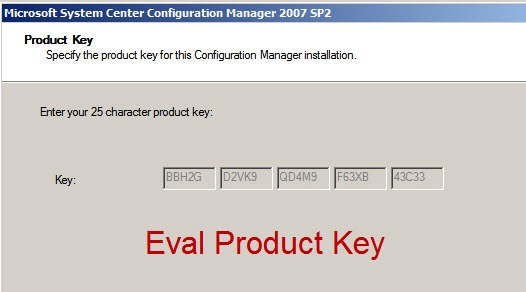
ConfigMgr Evaluation Product Key
I am currently on a project delivering a Microsoft Desktop Deployment Planning Service (DDPS) at a client. I am using an unattended script to build a proof of concept lab environment for the client. Part of the POC script is that it requires that the Product Key from the ConfigMgr install files be entered. That product key is embedded in the install files, so this seems a bit redundant, but I’m working with what I’ve been given.
Now…at this client, we are using the ConfigMgr w/ SP2 Evaluation Edition that can be downloaded from Microsoft. In order to get the product key from those install files, you have to start the installation and copy the key out. However…in order to start the ConfigMgr install, it requires that the system be a domain joined server. Because the script sets up the POC server as a new AD Domain Controller, the server is currently in a workgroup. In order to get the PID, I had to boot up my demo environment, revert to a snapshot that I had taken (pre-ConfigMgr install), start the installation and copy down the key.
In order to save myself (and hopefully others) time in the future, here is the product key for the ConfigMgr Evaluation Edition. There shouldn’t be any issues with me posting this key because #1 it is an eval edition that is freely downloadable and #2 the key is embedded in the install files…not like you can use it elsewhere without the eval edition install files. Granted, there may only be three people in the world other than myself that care about this post.
BBH2G-D2VK9-QD4M9-F63XB-43C33
Interview with Johan Arwidmark
Between MMS and TechEd last year, I was able to snag several people in the Microsoft management and deployment community for interviews for my blog. I finally got around to processing the last of those interviews and prepping it for posting.
I caught Johan Arwidmark just before I walked out the door of TechEd to fly home. It was a fun and entertaining (albeit short) conversation.
Enjoy finding out a bit about the personal side of one of the most recognized names in the worldwide deployment community!
Better Subselect Queries
Earlier this week was the January meeting of the Minnesota System Center User Group. Our content this month was centered around writing queries and troubleshooting tips. During the discussion, I was demonstrating how to create a subselect query using the ConfigMgr GUI. This was something that I blogged about almost two years ago…mainly as a thank you to Rod Trent for a fantastic post that he had done way back in 2001. Rod’s post put the creation of subselect queries on the bottom shelf for those of us who aren’t strong in SQL. Note: a subselect query is a “not” query…i.e. return all systems that do not have xyz.
One of the really cool things about our user group is that we have two guys who are Microsoft MVPs for ConfigMgr…Brian Mason and John Nelson from Wells Fargo. If you know anything about John Nelson…it’s that he is a freak of nature when it comes to creating insane queries in ConfigMgr. And yes…in this instance the term “freak of nature” is a high compliment!
So…frequently as we would talk about a particular query or way of searching for something…after we had a workable query, we would ask for input from John on how to improve the query. He had lots of very useful input…including on subselect queries. After the meeting while talking with Brian and John, we discussed creating an updated post on subselect queries…so here goes…
“Green” Dish Detergent?
This morning I went to get a plastic cup out of our dishwasher that had just finished running. When I pulled it out, the cup was still dirty…it felt slimy or greasy. It actually made me wonder if we had forgotten to put detergent in the dishwasher when we ran it. I checked and we had put detergent in from a newly opened box. The fact that it was a new box triggered my memory…
I had seen a few news articles last year about some areas passing laws limiting or banning the use of phosphates in dishwasher detergent. In the articles I had seen about states banning phosphates, people quickly found out that their dishes weren’t getting clean. Some residents in Washington state were headed across the border into Idaho to buy detergent.
I checked the box and found the proud proclamation in very tiny print on the back of the box: “Contains no phosphates!” We ran the dishwasher a second time. Same result. I then loaded up my son and headed to Target to see if any other dish detergent had phosphates. After grabbing a box of Cascade that does have phosphates we once again have clean dishes.
I’ve seen the “green” initiatives that are driving the phosphate free dish detergent bans. I support conservation. My family recycles (even with the convoluted restrictions on what can/cannot be recycled in our area). I am very conscious of gas mileage and how the way I drive affects that. I do my best to waste as little as possible. However…if I have to wash a load of dishes multiple times with the phosphate free detergent (and then again with detergent that actually gets the job done)…is that really “green”?
A Sierra Club page claims: “Safe, effective, phosphate-free detergents are already on the market and among the most effective, according to Consumer Reports.” They don’t link to anything by Consumer Reports. After my experience (and the experience of those traveling across state lines to buy detergent) I seriously question the term “effective” in that quote. Matter of fact I found a reference to a Consumer Reports article on dish detergents from August 2009 that stated “Detergents without phosphates … tended to perform worst overall.”
User Group SWAG!!!
A while back I wrote that I became president of the Minnesota System Center User Group. Right after becoming president, the former president (Joey Gleason) told us about Microsoft’s User Group Support Services. UGSS helps technical community leaders with speakers, funding, publicity and SWAG for events.
Pretty soon after that, Tim Zabilla (the VP of the user group) signed up our group with UGSS. A couple of months later Tim and I got an email from UGSS giving us the opportunity to register for a “User Group Kit”. The email said the kit would be a $500 value of SWAG to give away at the user group. I jumped on it and immediately registered our group for one of the kits before they ran out.
It arrived today. WOW! So…inside were really two kits. First was the “Leadership Assistance Kit” pictured to the side (click it for a better view). It contained:
- Microsoft Enterprise Software Roadmap
- Business Intelligence Resource Kit
- UGSS Leader Assistance Resource Kit (5 DVD set)
- The Rational Guide to Building Technical User Communities by Greg Low
- Word of Mouth Marketing by Andy Sernovitz
- 5 promo copies of Windows 7 Ultimate for giveaways (not demo or eval)
- 180 Day Eval of Windows Server 2008 R2 (for Itanium)
- An offer from TechSmith for a copy of Camtasia Studio or Snagit to give away
But…that wasn’t all…that was just the Leadership Assistance Kit. The actual “User Group Kit” contained the following for us to use as giveaways:
- Three copies of Windows 7 Inside Out
- Three copies of Windows 7 Administrator’s Pocket Consultant
- Three copies of HALO 3 ODST for the Xbox 360
- Three copies of Forza Motorsport 3 for the Xbox 360
- other small Swag items
 Ask my wife…I was excited. Then I read the letter that came with the kit and got surprised again. The exact quote was: “we are getting back on our regular schedule of shipping user group kits on a quarterly basis. Enclosed is your group’s kit for this quarter.” Seriously? In a few months we’re going to get another one of these!
That is AWESOME! I can hardly wait til the February meeting (Feb 18) to give a bunch of stuff away!
Installing an Application as a Non Admin
Recently I was working with a client who had the following business requirements:
- Users are not administrators on their XP workstations
- Traveling users need the ability to install “whatever software they wish” while on the road
That’s a tricky combination of requirements. At face value this isn’t possible. As I was thinking through the problem, I came up with an idea for how to get around this issue. I could create an HTA/VBscript wrapper that I would advertise with ConfigMgr…that the user could run via Run Advertised Programs. Through this HTA they would be able to browse to locate the EXE/MSI that they wanted to install. Because it is running via ConfigMgr, it will have permissions…running as Local System.
The script could also have other data gathering capabilities for inventory purposes. Obviously from an enterprise perspective, someone would need to periodically review this inventory to ensure that all software was properly licensed…and that the user wasn’t installing garbage software.
Now…from a “best practices” perspective, this is not something you want to do. Way too big of a whole for garbage to enter your environment. But…if this is a requirement for whatever reason…at least theoretically, this would work. I have not written the script yet. We are still talking with the client about whether this is a true requirement or not. That is yet to be determined.
After fleshing out the idea, I called Brian Mason to run the idea by him to see if I was in the ballpark of reality. He confirmed that this would work. I think his statement was something like, “Oh yeah, people have been doing that for years.” So…while it may have been a great idea…it’s not an original idea. :-)
Interview with Mikael Nystrom (Part 2 of 2)
At long last, here is the second half of the interview with Mikael Nystrom. Enjoy.
Setup cannot upgrade the ConfigMgr database
Was recently working on upgrading SMS 2003 to ConfigMgr SP2 and ran into a problem upgrading the database. All pertinent prereqs passed, but when it started the actual installation, it errored out with the following popup:
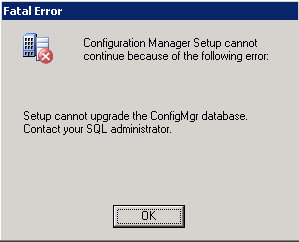 When I checked the ConfigMgrSetup.log file, I saw the following messages:
Upgrade database…
The database compatibility level for SMS_CC1 is 90
***SqlError: [08S01][11][Microsoft][ODBC SQL Server Driver][Shared Memory]General network error. Check your network documentation.
READ_COMMITTED_SNAPSHOT enabled.
***SqlError: [42000][5808][Microsoft][ODBC SQL Server Driver][SQL Server]Ad hoc update to system catalogs is not supported.
SqlExecute <if NOT EXISTS(select * from sys.configurations where name=’clr enabled’ and value_in_use=1) begin exec sp_configure ‘clr enabled’, 1 RECONFIGURE end >
FinalSqlOperations::Could not enable SQL CLR.
Setup cannot upgrade the ConfigMgr database. Contact your SQL administrator.
So…I searched on everything in those log entries and came up blank. Ad-hoc updates are enabled. Setup was successfully enabling SQL CLR. Something was still failing.
I finally came across this forum thread where a user stated that the problem in their environment was the SQL authentication mode. Now…I’ve always seen that message during the prereq check, but since it is a warning instead of an error, I have always ignored it…and have never had a problem until now. After changing the SQL authentication mode to be only “Windows Authentication”, the setup went through without a problem.
Out of Memory Error – Boot.ini 3GB Switch
Recently while working at a client I was installing the BITS 2.5 update for Server 2003 (as part of the prereqs for ConfigMgr), but when the server rebooted at the end of the update it essentially died. No more Remote Desktop connection…the server wasn’t even pingable. I didn’t have access to the client’s datacenter, so I was pretty much hamstrung until they could get me access to the console to look at the log files. Once I finally got to the server (booted into Safe Mode), the log files were chugging full of red. Some of the log entries were:
The Application log had the following (key messages in red):
Event ID: 4613
Description:
The COM+ Event System detected an unexpected error from a Win32 API call at line 917 of d:\nt\com\complus\src\events\tier2\notify.cpp. A call to PostThreadMessage failed with error code : "The operation completed successfully. "Event ID: 4613
Description:
The COM+ Event System detected an unexpected error from a Win32 API call at line 558 of d:\nt\com\complus\src\events\tier2\notify.cpp. A call to MsgWaitForMultipleObjects failed with error code 8: "Not enough storage is available to process this command. "Event ID: 8193
Computer: SERVERNAME
Description:
Volume Shadow Copy Service error: Unexpected error calling routine IEventSystem::Store. hr = 0x80040206.Event ID: 1508
Description:
Windows was unable to load the registry. This is often caused by insufficient memory or insufficient security rights.DETAIL – The system has attempted to load or restore a file into the registry, but the specified file is not in a registry file format. for C:\Documents and Settings\accountname\ntuser.dat
Event ID: 1502
Description:
Windows cannot load the locally stored profile. Possible causes of this error include insufficient security rights or a corrupt local profile. If this problem persists, contact your network administrator.DETAIL – The system has attempted to load or restore a file into the registry, but the specified file is not in a registry file format.
In the System Log was the following string of events:
Event Source: NtServicePack
Event ID: 4377
Description:
Windows Server 2003 Hotfix KB923845 was installed.Event ID: 1074
Description:
The process svchost.exe has initiated the restart of computer SERVERNAME on behalf of user NT AUTHORITY\SYSTEM for the following reason: No title for this reason could be found
Reason Code: 0x80070020
Shutdown Type: restart
Event ID: 3113
Description:
Initialization failed because the requested service redirector could not be started.Event ID: 2508
Description:
The server service was unable to load the server driver.Event Type: Information
Event Source: Application Popup
Event ID: 26
Description:
Application popup: wscript.exe – Application Error : The application failed to initialize properly (0xc0000142).Event Type: Information
Event Source: Application Popup
Event ID: 26
Description:
Application popup: : \SystemRoot\system32\DRIVERS\srv.sys failed to loadEvent Type: Error
Event Source: Application Popup
Event ID: 333
Description:
An I/O operation initiated by the Registry failed unrecoverably. The Registry could not read in, or write out, or flush, one of the files that contain the system’s image of the Registry.
The key messages above are the ones related to insufficient memory or “not enough storage”. Now this server has 12GB of RAM. That should not be a problem. Then I remembered an email from the client’s server team where they told me that they had set the /3GB switch in the boot.ini file. I did a little digging on that switch and came across articles here, here, here, here here and here.
Essentially it boils down to some common misunderstanding about what the 3GB switch does. The client has a requirement to use Server 2003 32-bit for this installation. Normally, 32-bit Windows operating systems have a 4GB RAM limit. Often people mistakenly believe that the /3GB switch expands the use of RAM above the 4GB limit. In actuality, the /PAE switch is used for this. Utilizing that switch Server 2003 Enterprise SP2 will then support 32GB of RAM. So…what does the /3GB switch do?
Paraphrasing one of the articles linked above, 32-bit Windows OSes implement a virtual memory space that is limited to 4GB. Normally this is split into two sections…2GB for Kernel and 2GB for User-mode processes. The /3GB switch makes 3GB available for user-mode processes, but leaves only 1GB available for Kernel.
This appears to be exactly what happened. Because the 3GB switch was set and only 1GB was available for kernel operations, the system essentially ran out of memory for completing the installation of BITS. Once I removed the 3GB switch (and left the PAE switch intact) and rebooted the system, it came back up.
The Blind Side
I very rarely go see a movie in the theater. Before this week, I don’t think I have ever seen a movie in a theater on its opening day. But ever since I heard that Michael Lewis’s fantastic book The Blind Side, Evolution of a Game was being made into a movie, I have been looking forward to seeing it in the theater on opening day. I went to watch it last Friday on opening day, and I honestly wanted to turn around and go back in the theater to watch it again. They did an outstanding job with this movie. I just got back from watching it a second time (with Julie’s grandfather and my friends Tim and Nate).
In the book, Michael Lewis weaves together two storylines. One storyline is that he traces the evolution of the left tackle position in football from a utility position like any other lineman to a specialized position that is often one of the highest paid positions on the team. The reason for this is that the left tackle is responsible for protecting the quarterback’s blind side. He traces it back to teams needing to adjust to protecting their quarterback from defensive players like Lawrence Taylor.
The second storyline of the book is following the life of Michael Oher. Michael was an All American football player at Ole Miss who is now playing for the Baltimore Ravens. Michael was homeless in Memphis TN, and through a series of events came to be enrolled in a private school in Memphis and was taken in by a wealthy family who had compassion on his situation. The eventually became his legal guardians.
Now…anyone who knows me for very long knows that I went to Ole Miss and am a die hard fan. Yes it was fun hearing places mentioned in the movie that I knew from school. I ate lunch in Johnson Commons. However, the movie is fantastic outside of my Ole Miss leanings.
Speaking at MNSCUG.ORG
Don’t know why I didn’t think to post this earlier, but I am speaking at the Minnesota System Center User Group (MNSCUG.ORG) this week. I will be talking about Operating System Deployment with ConfigMgr, and addressing some of the particular gotchas to look out for with Windows 7 deployments.
If you are in the Twin Cities, come check out the user group. We’d love to have you.
The meeting is tomorrow (11/18) at the Microsoft office in Bloomington. Food and beverages arrive at 4:30, and the meeting starts at 5:00. We should end around 7:30 or so. There will be some nice door prizes including two copies of the MMS 2009 post conference DVDs…but to be eligible for the door prizes (and to help us plan for food) you must register at the link below. Hope to see you there!
Interview with Mikael Nystrom (Part 1 of 2)
While at TechEd North America earlier this year, I had the pleasure of interviewing Mikael Nystrom from TrueSec. I knew very little about Mikael before sitting down with him, and it ended up being a very fun interview. It also ended up being over an hour long! Below is the first half of the interview. Enjoy!
Just a note…the interviews from TechEd have been taking me a long time to post…mainly because of my frustration with some glitches with my blog host. I have had significant issues getting the audio to work. I have uploaded the audio in the format that is required by the audio player, but the player won’t play the audio. The previous interviews have each taken multiple hours to get the technical glitches worked out. This time I simply gave up on resolving the issues and produced a “video” from the audio and the one picture I have of me with Mikael at TechEd.
Comments vs Contact Form
Over the last week I have had three people email me questions via the Contact Form on my blog with questions about past posts. This was instead of leaving a comment on the actual post on the blog. The last three posts that I have put up are answers to those three emails. I prefer to answer it here so that my responses can benefit more people than just the person asking the question.
If you have a question about something I have written, you can feel free to ask via either the contact form or by leaving a comment. I will try to respond in a timely manner.
PowerShell Script – Loop
Rick emailed me asking the following question about the PowerShell script I wrote last year for adding a domain user to the local admin group on a computer.
How would I loop thru the script for multiple machines ? i.e how to add an account to the local admin groups to a list of systems in a csv
Short answer is you need to look using two PowerShell cmdlets in conjunction. They are:
- Import-CSV
- ForEach-Object
You can read about them and a bit about how to use them here, and here. Additionally, I would refer anyone with scripting questions to check out the Scripting Guys blog…it is fantastic.
Hope that helps.
Office 2007 Install Issue
Erik sent the following question re: a special issue with installing Office 2007.
We are in the process of trying to push out office 2007 w/SP2 w/o Access and Publisher and for it to uninstall Outlook 2003, but leave everything else and for it to do it unattended and silent. Now I did create the .MSP file which does this and it works great, but before our company decided to do this in an organized way, they were giving Excel 2007 out for people to try or people don’t have SP2 for Office 2007. Now I have tried everything to create an SMS package (SMS 2003) that will work, but if I just send out the package with the .MSP file it prompts people to interact with it if they already have anything part of Office 2007 on their computer. Now we created a package in sms that will uninstall office 2007, and it’s linked to another package in sms to reinstall office 2007, but it wants a restart on the computer before it will reinstall office 2007. Now if you guys know a way that will work without uninstalling office 2007 first that great too. I’ll take an ideals at this moment.
You do have an interesting problem. Because your company chose to give out part of Office 2007 before the full deployment was packaged and prepared, you will likely have some careful steps to take for those computers.
One way to handle that would be to create a collection to locate the users that have Excel 2007 already installed. From your description, it sounds like those are the only ones that won’t install silently at this point. You may need to communicate with those users to prepare them that a reboot will be required as part of this install. If you send this as a non-mandatory advertisement, they can choose when to do the installation at a time when a reboot won’t affect them as much. I would tell them to just plan to run it when they leave for lunch.
Without building out a similar scenario in my demo environment to test it, I don’t know offhand of a way to do this without uninstalling Excel first. I’m actually a bit surprised that the installation that you made silent still asked for user input. Did you follow my instructions in this post?
VBS for Adding User to Local Admin Group
Scott sent me this question via the contact form on my blog:
I saw a post you made about using PowerShell to add a domain user to a local administrator group during a task sequence (https://verbalprocessor.com/2008/04/08/add-domain-user-to-local-administrators-group/). I am trying to do the same thing, but don’t necessarily want to incorporate PowerShell at this time. I was hoping to use MDT and the Administrators1 task sequence variable, but this doesn’t seem to work. I have a vbscript that works when run manually, but it can’t connect to the domain to get the user account object when executed via the task sequence. I’ve tried a few different methods to run under a certain service account, but unless that account is an admin, it doesn’t seem to work. You had indicated that you have a VBscript that was doing this successfully. Can I by any chance get a copy of that script? If you have any other suggestions for me, I would welcome that as well. I look forward to hearing from you. Thank you!
I think Scott may have misunderstood what I did in that post. In the post that Scott references I wrote a PowerShell script for running manually after the task sequence is finished to add a domain user to the local admin group of a remote machine. In that post I actually mentioned that I had trouble getting it to work with VBS…even though I was using a Scripting Guys post to try to build the VBS version. I can’t locate the particular Scripting Guys article that I was looking at, but there are several posts related to this from community members at this link.
I did have a VBS that would do this as part of a task sequence that I used at a client earlier this year, however for some reason it stopped working in my demo environment…and I don’t know why. So unfortunately, I don’t have a working VBscript for this that I can share.
SQL Server Version Numbers
This morning I have been building out a new ConfigMgr demo environment on my laptop based on Server 2008 R2. I had already installed SQL 2008, but couldn’t remember if I had installed SP1 for SQL 2008 or not. I looked at the version number, but then had to go to Microsoft to find out what the version number equated to in terms of SP level. For future reference to myself and others, here is a concise list of SQL Server version numbers and the corresponding friendly name. This will be useful if you already know the version number. If you need to know how to get the version number from you SQL server, refer to this page (which is where this list of numbers came from). That page lists the SQL queries for each version to perform to obtain the version number.
| SQL Version | Version Number |
| SQL Server 2008 RTM | 2007.100.1600.0 |
| SQL Server 2008 SP1 | 2007.100.2531.0 |
| SQL Server 2005 RTM | 2005.90.1399 |
| SQL Server 2005 SP1 | 2005.90.2047 |
| SQL Server 2005 SP2 | 2005.90.3042 |
| SQL Server 2005 SP3 | 2005.90.4035 |
| SQL Server 2000 RTM | 2000.80.194.0 |
| SQL Server 2000 SP1 | 2000.80.384.0 |
| SQL Server 2000 SP2 | 2000.80.534.0 |
| SQL Server 2000 SP3 | 2000.80.760.0 |
| SQL Server 2000 SP3a | 2000.80.760.0 |
| SQL Server 2000 SP4 | 2000.8.00.2039 |
| SQL Server 7.0 RTM | 7.00.623 |
| SQL Server 7.0 SP1 | 7.00.699 |
| SQL Server 7.0 SP2 | 7.00.842 |
| SQL Server 7.0 SP3 | 7.00.961 |
| SQL Server 7.0 SP4 | 7.00.1063 |
| SQL Server 6.5 RTM | 6.50.201 |
| SQL Server 6.5 SP1 | 6.50.213 |
| SQL Server 6.5 SP2 | 6.50.240 |
| SQL Server 6.5 SP3 | 6.50.258 |
| SQL Server 6.5 SP4 | 6.50.281 |
| SQL Server 6.5 SP5 | 6.50.415 |
| SQL Server 6.5 SP5a | 6.50.416 |
| SQL Server 6.5 SP5a Update | 6.50.479 |
Windows XP Downgrade Licensing
Recently while helping out with a Windows 7 event at a training center here in the Twin Cities, I got into a discussion with one of the attendees who was planning the move from XP to Windows 7 for his company. In particular he was expressing concern about the loss of support for Windows XP, and one of his main concerns was related to his perception that the end of support for XP also meant that he would no longer be able to legally install Windows XP.
That prompted me to ask some questions and do some research into whether he was right or not. Does the end of support mean that he would not be able to install XP via his enterprise deployment system? In my research, it appears that he may have confused the lack of ability to purchase Windows XP with the unrelated issue of can he legally install it. He did not take into account OS Downgrade Rights.
In layman’s terms “downgrade rights” is the ability to purchase a newer operating system license, and then downgrade that license to allow you to install an earlier OS. For example, you can purchase Vista or Windows 7 and then use the downgrade rights to install Windows XP…even though the license you purchased is for the newer OS.
BTW…let me make one thing clear now before I am misunderstood in this post…I am not advocating staying on Windows XP. I made the move to Windows 7 at the Release Candidate stage. It was rock solid then, and the RTM is equally rock solid. For that matter…I ran Vista on my production laptop starting at Beta 2…and was very happy with it. This post is not telling anyone to stick with XP…it is simply intended to clarify the licensing issues of what you can do if you have a business need for some systems to stay on XP. (i.e. you have older machines that may not be capable of running Vista/Win7 that will stay in use for a while longer…and you still need the ability to image them as needed.) So…with all that said…
Downgrade rights can be broken out into two categories based on whether you have a Volume License agreement with Microsoft or not. If you have a VL agreement (Enterprise Agreement or a Select Agreement with Software Assurance on Windows), your downgrade rights are practically limitless. The quote from the Downgrade Rights Volume Licensing Brief (this refers to Vista, but my assumption is that Windows 7 Enterprise would also fall under this…although it should be noted that this is my assumption…not anything I have seen officially in writing from Microsoft):
If I have Windows Vista Enterprise, what can I downgrade to?
Downgrade rights in the Volume Licensing programs provide customers with the right to downgrade to any prior version of the same product. Windows Vista Enterprise is a new type of product and does not have a prior version. However, customers licensed for use of Windows Vista Enterprise are licensed for Windows Vista Business, and it can be downgraded to the Windows XP Professional, Windows 2000 Professional, Windows NT® 4.0, Windows NT 3.51, Windows 98, or Windows 95 operating system.
If you don’t have a Volume License agreement and your desktop OS license is from the OEM, you fall under the Downgrade Rights for OEM customers. This is a different section of that document that provides a limited time frame for how long your the OEM Downgrade Rights last. Essentially, the OEM Downgrade rights are for 18 months after the General Availability of Windows 7 or the release of a Windows 7 Service Pack…whichever is earlier. GA was October 22, 2009, which would make the cutoff April 22, 2011 unless a SP is released earlier than that. From the brief linked above:
Can I downgrade my OEM version of Windows 7 Professional to Windows XP Professional?
For a limited time of 18 months after the general availability of Windows 7 or the release of a Windows 7 Service Pack, whichever is earlier, the OEM license of Windows 7 Professional and Windows 7 Ultimate will include downgrade rights to Windows XP Professional. After that period the OEM license will enable downgrade rights to Windows Vista Business.
Okay…so that covers downgrade from Windows 7 to XP. The other question for companies who have a desire to continue to roll out XP would be related to Windows Vista. Vista will continue to have downgrade rights to XP…so when will Microsoft stop selling Vista…because technically you could still purchase Vista and downgrade to XP after the 18 month cutoff mentioned above…if they are still selling Vista at that point.
So…hopefully that makes the downgrade rights issue a bit clearer than mud.

Subscribe
Recent Comments
-


 The Realm of the Verbal Processor