Who would you like to see interviewed?
Based solely on the number of hits that the Wally Mead interview has gotten, I would say that the SMS/SCCM community has a fair amount of interest in getting to know more about some of the people that we see on the forums or presenting at conferences. So…who would you like to see interviewed?
Leave a comment below to let me know who you’d like to hear from. If someone has already mentioned someone that you are interested in, leave a comment anyway…let it be like adding a vote. Don’t know if I will be able to make an interview happen with those that you are interested in hearing from, but I’ll do my best. Just give me ideas of who you are interested in getting to know.
Oh yeah, I will be working on cleaning up the second part of the Wally interview and hopefully posting it later this week. Check back to hear it…or subscribe to my RSS feed to be automatically alerted.
Interview with Wally Mead – Part 1
 Over the last several months I’ve developed a relationship with Wally Mead. Wally is a Senior Program Manager at Microsoft where he works with the System Center Configuration Manager product team. He handled a bug report that I submitted about SCCM (here and here…bug was fixed in SP1) and we connected offline afterwards. He had seen in the bug submission that I work for Campus Crusade for Christ, and he has had interaction with CCC in the past.
This week Wally has been in Orlando at Tech-Ed, so I invited him to come out and let me take him on a tour of CCC’s headquarters. After the tour we sat down and Wally allowed me to interview him. Below is the first portion of the interview. I will post parts 2 and 3 sometime next week.
I’d like to also offer a public thank you to Wally for taking the time to sit down with me. It was a very enjoyable time, and if Chris ends up coming to UCF, I look forward to seeing you more often!
Another thing…who else would you like to see interviewed? Let me know on that page and I’ll see what I can do.
Enjoy!
Part 2 of the interview is live now…
[Update 6-22-08: It was brought to my attention in the comments below that if you don’t have the Adobe Flash Plugin on your computer, you will not see the audio player that is just below the “Enjoy!” line. You can get it here if you don’t already have it.]
SCCM and WSUS on Server 2008
As part of my reinstall of my SCCM server, I have been beating on a problem for way longer than I should have…and finally got it fixed. It is related to SCCM not being able to sync with WSUS. Background: we are a small environment by SMS/SCCM standards, so we are able to work quite well with all components on the same server. The only thing that is external to “the” SCCM box is that we have SQL off-box.
When I set up WSUS/SCCM as the documentation recommended, I got some crazy errors. I have posted the relevant sections below. The key portion of the wsyncmgr.log was:
Sync failed: WSUS server not configured. Source: CWSyncMgr::DoSync
Having dealt with a similar issue before, I was pretty sure that the errors has something to do with the way that SCCM connects as Local System and the internet settings associated with the System account. In particular I had dealt with a proxy issue before that was causing similar errors. In doing my research on the problem I came across a couple of posts that proved helpful. In this one, a Microsoft guy posted that two ways to fix this were to either run IE as Local System or to use the ProxyCfg.exe tool (Server 2003). I’m on Server 2008, so I found another post that showed how to do the proxycfg stuff in Server 2008 using netsh. After doing the second option (netsh), everything looked good as far as the proxy was concerned…it wasn’t using a proxy. That wasn’t the problem.
So…what about starting IE as Local System and looking at those settings? I’ve posted before about how to run an app as Local System. The Vista option in that post works on Server 2008.
Once I did that, I went into IE settings and drilled down through Tools | Internet Options | Connections | LAN Settings. The checkbox for “Automatically detect settings” was checked. I unchecked that box. Just for good measure I rebooted. That was probably not necessary, but I wanted to see the process start fresh after a reboot…easier to track in the log files.
Once that took effect and I triggered a synchronization, SCCM was able to sync with WSUS. Matter of fact…it is still synchronizing as I finish typing up this post. All because of a stupid little checkbox.
>>>>>>>>> Relevant Log Files <<<<<<<<<
In the WCM.log file…something is definitely not right:
System.Net.WebException: The underlying connection was closed: An unexpected error occurred on a receive. —> System.IO.IOException: Unable to read data from the transport connection: An existing connection was forcibly closed by the remote host. —> System.Net.Sockets.SocketException: An existing connection was forcibly closed by the remote host~~ at System.Net.Sockets.Socket.Receive(Byte[] buffer, Int32 offset, Int32 size, SocketFlags socketFlags)~~ at System.Net.Sockets.NetworkStream.Read(Byte[] buffer, Int32 offset, Int32 size)~~ — End of inner exception stack trace —~~ at System.Net.Sockets.NetworkStream.Read(Byte[] buffer, Int32 offset, Int32 size)~~ at System.Net.PooledStream.Read(Byte[] buffer, Int32 offset, Int32 size)~~ at System.Net.Connection.SyncRead(HttpWebRequest request, Boolean userRetrievedStream, Boolean probeRead)~~ — End of inner exception stack trace —~~ at Microsoft.UpdateServices.Administration.AdminProxy.CreateUpdateServer(Object[] args)~~ at Microsoft.UpdateServices.Administration.AdminProxy.GetUpdateServer(String serverName, Boolean useSecureConnection, Int32 portNumber)~~ at Microsoft.SystemsManagementServer.WSUS.WSUSServer.ConnectToWSUSServer(String ServerName, Boolean UseSSL, Int32 PortNumber)
Remote configuration failed on WSUS Server.
In the WSUSctrl.log were these entries which seemed to indicate that SCCM was configured correctly to talk to WSUS.
Found WSUS Admin dll of assembly version Microsoft.UpdateServices.Administration, Version…
Found WSUS Admin dll of assembly version Microsoft.UpdateServices.Administration, Version…
Found WSUS Admin dll of assembly version Microsoft.UpdateServices.Administration, Version…
The installed WSUS build has the valid and supported WSUS Administration DLL assembly version …
Successfully connected to local WSUS server
Local WSUS Server Proxy settings are correctly configured as Proxy Name and Proxy Port 80
Successfully connected to local WSUS server
There are no unhealthy WSUS Server components on WSUS Server SCCMserver
Successfully checked database connection on WSUS server SCCMserver
Then in the wsyncmgr.log there is this failure when SCCM tries to run a synchronization:
Performing sync on retry schedule
STATMSG: ID=6701 SEV=I LEV=M SOURCE=”SMS Server” COMP=”SMS_WSUS_SYNC_MANAGER” SYS=SCCMserver SITE=SITEcode ….
Sync failed: WSUS server not configured. Source: CWSyncMgr::DoSync
STATMSG: ID=6703 SEV=E LEV=M SOURCE=”SMS Server” COMP=”SMS_WSUS_SYNC_MANAGER” SYS=SCCMserver SITE=SITEcode PID=1212 TID=2992 GMTDATE=Tue Jun 03 17:52:14.874 2008 ISTR0=”CWSyncMgr::DoSync” ISTR1=”WSUS server not configured” …
Sync failed. Will retry in 60 minutes
Sync time: 0d00h05m00s
Waiting 60 minutes for requests…
In the IIS log for WSUS:
#Fields: date time s-ip cs-method cs-uri-stem cs-uri-query s-port cs-username c-ip cs(User-Agent) sc-status sc-substatus sc-win32-status time-taken
2008-06-03 17:47:30 IPofSCCMserver POST /ApiRemoting30/WebService.asmx – 8530 – IPofSCCMserver Mozilla/4.0+(compatible;+MSIE+6.0;+MS+Web+Services+Client+Protocol+2.0.50727.1434) 401 2 5 7888
2008-06-03 17:47:32 IPofSCCMserver POST /ApiRemoting30/WebService.asmx – 8530 DOMAIN\SCCMserver$ IPofSCCMserver Mozilla/4.0+(compatible;+MSIE+6.0;+MS+Web+Services+Client+Protocol+2.0.50727.1434) 200 0 0 1886
2008-06-03 17:47:32 IPofSCCMserver POST /ApiRemoting30/WebService.asmx – 8530 DOMAIN\SCCMserver$ IPofSCCMserver Mozilla/4.0+(compatible;+MSIE+6.0;+MS+Web+Services+Client+Protocol+2.0.50727.1434) 200 0 0 405
2008-06-03 17:47:32 IPofSCCMserver POST /ApiRemoting30/WebService.asmx – 8530 DOMAIN\SCCMserver$ IPofSCCMserver Mozilla/4.0+(compatible;+MSIE+6.0;+MS+Web+Services+Client+Protocol+2.0.50727.1434) 200 0 0 15
2008-06-03 17:47:32 IPofSCCMserver POST /ApiRemoting30/WebService.asmx – 8530 DOMAIN\SCCMserver$ IPofSCCMserver Mozilla/4.0+(compatible;+MSIE+6.0;+MS+Web+Services+Client+Protocol+2.0.50727.1434) 200 0 0 62
2008-06-03 17:47:32 IPofSCCMserver POST /ApiRemoting30/WebService.asmx – 8530 DOMAIN\SCCMserver$ IPofSCCMserver Mozilla/4.0+(compatible;+MSIE+6.0;+MS+Web+Services+Client+Protocol+2.0.50727.1434) 200 0 0 0
2008-06-03 17:47:32 IPofSCCMserver POST /ApiRemoting30/WebService.asmx – 8530 DOMAIN\SCCMserver$ IPofSCCMserver Mozilla/4.0+(compatible;+MSIE+6.0;+MS+Web+Services+Client+Protocol+2.0.50727.1434) 200 0 0 15
2008-06-03 17:47:32 IPofSCCMserver POST /ApiRemoting30/WebService.asmx – 8530 DOMAIN\SCCMserver$ IPofSCCMserver Mozilla/4.0+(compatible;+MSIE+6.0;+MS+Web+Services+Client+Protocol+2.0.50727.1434) 200 0 0 0
2008-06-03 17:47:32 IPofSCCMserver POST /ApiRemoting30/WebService.asmx – 8530 DOMAIN\SCCMserver$ IPofSCCMserver Mozilla/4.0+(compatible;+MSIE+6.0;+MS+Web+Services+Client+Protocol+2.0.50727.1434) 200 0 0 15
2008-06-03 17:47:32 IPofSCCMserver POST /ApiRemoting30/WebService.asmx – 8530 DOMAIN\SCCMserver$ IPofSCCMserver Mozilla/4.0+(compatible;+MSIE+6.0;+MS+Web+Services+Client+Protocol+2.0.50727.1434) 200 0 0 0
2008-06-03 17:47:32 IPofSCCMserver POST /ApiRemoting30/WebService.asmx – 8530 DOMAIN\SCCMserver$ IPofSCCMserver Mozilla/4.0+(compatible;+MSIE+6.0;+MS+Web+Services+Client+Protocol+2.0.50727.1434) 200 0 0 15
2008-06-03 17:47:32 IPofSCCMserver POST /ApiRemoting30/WebService.asmx – 8530 DOMAIN\SCCMserver$ IPofSCCMserver Mozilla/4.0+(compatible;+MSIE+6.0;+MS+Web+Services+Client+Protocol+2.0.50727.1434) 200 0 0 15
2008-06-03 17:47:32 IPofSCCMserver POST /ApiRemoting30/WebService.asmx – 8530 DOMAIN\SCCMserver$ IPofSCCMserver Mozilla/4.0+(compatible;+MSIE+6.0;+MS+Web+Services+Client+Protocol+2.0.50727.1434) 200 0 0 0
2008-06-03 17:47:32 IPofSCCMserver POST /ApiRemoting30/WebService.asmx – 8530 DOMAIN\SCCMserver$ IPofSCCMserver Mozilla/4.0+(compatible;+MSIE+6.0;+MS+Web+Services+Client+Protocol+2.0.50727.1434) 200 0 0 15
2008-06-03 17:49:20 IPofSCCMserver POST /reportingwebservice/reportingwebservice.asmx – 8530 – IPofSCCMserver Mozilla/4.0+(compatible;+MSIE+6.0;+MS+Web+Services+Client+Protocol+2.0.50727.1434) 200 0 0 5565
2008-06-03 17:49:21 IPofSCCMserver POST /ApiRemoting30/WebService.asmx – 8530 – IPofSCCMserver Mozilla/4.0+(compatible;+MSIE+6.0;+MS+Web+Services+Client+Protocol+2.0.50727.1434) 401 2 5 15
2008-06-03 17:49:21 IPofSCCMserver POST /ApiRemoting30/WebService.asmx – 8530 DOMAIN\SCCMserver$ IPofSCCMserver Mozilla/4.0+(compatible;+MSIE+6.0;+MS+Web+Services+Client+Protocol+2.0.50727.1434) 200 0 0 15
2008-06-03 17:49:24 IPofSCCMserver POST /ServerSyncWebService/serversyncwebservice.asmx – 8530 – IPofSCCMserver Mozilla/4.0+(compatible;+MSIE+6.0;+MS+Web+Services+Client+Protocol+2.0.50727.1434) 200 0 0 2198
2008-06-03 17:49:25 IPofSCCMserver POST /ClientWebService/Client.asmx – 8530 – IPofSCCMserver Mozilla/4.0+(compatible;+MSIE+6.0;+MS+Web+Services+Client+Protocol+2.0.50727.1434) 200 0 0 810
2008-06-03 17:49:25 IPofSCCMserver POST /SimpleAuthWebService/SimpleAuth.asmx – 8530 – IPofSCCMserver Mozilla/4.0+(compatible;+MSIE+6.0;+MS+Web+Services+Client+Protocol+2.0.50727.1434) 200 0 0 763
2008-06-03 17:49:27 IPofSCCMserver POST /DssAuthWebService/DssAuthWebService.asmx – 8530 – IPofSCCMserver Mozilla/4.0+(compatible;+MSIE+6.0;+MS+Web+Services+Client+Protocol+2.0.50727.1434) 200 0 0 654
Applicationhost.config – not well formed XML Problems
On Friday I was troubleshooting an issue on our SCCM server related to updating a package on a Distribution Point. It kept failing with errors like the following:
2302 “SMS Distribution Manager failed to process package “”Random App”” (package ID = ABC00003).” Possible cause: …
2342 “SMS Distribution Manager is starting to distribute package “”Random App”” to distribution point “”[“”Display=\\SCCMServer\””]MSWNET:[“”SMS_SITE=ABC””]\\SCCMServer\””.”
2300 “SMS Distribution Manager is beginning to process package “”Random App”” (package ID = ABC00003).”
30125 “User “”domain\user”” added new distribution points to a package named “”Random”” (ABC00003).”
After digging around for a while I came to discover that the IIS services had failed to start. When I tried to start the IIS service, I got the lovely message that applicationhost.config is not well-formed XML. Now…that file on my server is over 1000 lines long. I don’t know if it is well formed or not. So…I hit Google and came across a page talking about an issue where that file will get corrupted if you are using either OneCare or Forefront Client Security as your anti-virus software. I’m using FCS on my server.
The workaround listed on that page is:
Create the following key “HKEY_LOCAL_MACHINE\SYSTEM\CurrentControlSet\Services\MpFilter\Parameters” . Add a DWORD value “ScanOnCleanup” and set it to 0. Restart OneCare/Forefront service.
I did the above workaround, but what about the corrupted applicationhost.config? I took a gamble…perhaps the file is corrupted, but the text is intact. I simply opened the applicationhost.config file in EditPlus, saved it as a new file, and copied the new file to the proper location.
IIS Started. SCCM distributed the package. I went home happy.
WSUS on Server 2008
As part of my installation of SCCM on Server 2008, I have needed to install WSUS on Server 2008 as well. Being the good little engineer that I am, I looked at the WSUS Release Notes to ensure that I knew about any issues with installing WSUS on Server 2008. When I did so, I discovered that there is a typo in the Release Notes. At the bottom of the Release Notes is a section labeled “WSUS 3.0 on Windows Server 2008” that lists two issues…only one of which applied to my scenario.
Issue 1: The IIS 7.0 configuration file must be updated before running WSUS 3.0
Before running WSUS 3.0 on Windows Server 2008, the IIS configuration file must be updated. You will need to take the following steps:
1. Open the IIS configuration file: %WINDIR%\system32\inetsrv\applicationhost.config
2. In the <System.webServer><modules> tag, remove <add name=”CustomErrorMode”> if it exists.
3. In the <System.webServer><modules> tag, add <remove name=”CustomErrorMode”>.
The resulting tag should look like this:
      <System.webServer>
<modules>
<remove name="CustomErrorMode">
</modules>
</System.webServer>
So, I went into the applicationhost.config file and made that modification. The “add name” tag wasn’t there, so all I had to do was add the “remove name” tag. After adding it exactly as the release notes listed, I went into my WSUS setup. When it got to the section where it would ask about whether to use the Default IIS website or a custom website, I got an error message instead. It stated:
“The wizard could not detect any existing Web sites. To try again, verify that IIS is running, use IIS Manager to resolve the problem and then click Next.”
When I opened up IIS Manager I got this error message:
There was an error when trying to connect. Do you want to retype your credentials and try again?
Details:
Filename:
\\?\C:\Windows\system32\inetsrv\config\applicationHost.config
Line number: 844
Error: Configuration file is not well-formed XML
When I looked at line 844 (which was easy to find in EditPlus), that was the “</modules>” line from above. That line is fine. However (knowing that sometimes the error is earlier in the file than where it shows up as an error to the application)…line 843 does have an error in it…an error straight out of the release notes. The “remove name” tag is missing a forward slash. It should be:
<remove name=”CustomErrorMode”/>
After making that change and starting IIS, WSUS was much happier when it installed.
SCCM SP1 Download is live now!
Sometime around 8:30-8:45PM Eastern Time, the SP1 update for SCCM went live on the Microsoft Download Center. Here is the direct link to the download. (See Update #2 below) As I type this I am 49% done with the download. You know that that means? I get to install it tomorrow morning!
[Update: 9:10PM…my download finished!]
[Update #2: Note that the download link above is to the Upgrade version. You need to have a fully functioning SCCM RTM site to use it. There is also a slipstreamed eval version. Had I thought for half a second last night I would have known that they wouldn’t put a fully licensed (with embedded product key) download on the public site. And since I didn’t download the correct version last night, I’m stuck downloading in the middle of the day along with everyone else…I need the slipstreamed version to install on Server 2008. Last night it downloaded in 20 minutes or so. I’ve been downloading for an hour so far…with an estimated two hours more to go.]
SCCM SP1 Released!
Just got alerted that SP1 for SCCM has been signed off on and should hit the download center soon!
[Note: this post was much shorter than planned. I was sitting in the exam room at my wife’s OB when I got the email alert. I was blogging it from my phone when the doctor walked in. Had to finish up quickly!]
Build and Capture TS with DFS
I learned this a while back, but never blogged it. I was building a Build and Capture Task Sequence in SCCM. At the end when it started the capture, I wanted it to upload the WIM to my DSL which happens to be on a Distributed File System share. It failed. I can’t remember the error that it gave, but eventually I determined that it simply couldn’t copy to the DFS share. I pointed it to a regular share (that went to the same folder as the DFS share), and it worked fine.
I use the DFS share as the source to all of my programs without any problems. But for the Build and Capture, I have to reference a plain server share instead.
SCCM Reinstall – Take 3
At the risk of sounding a bit schizophrenic, I’ve changed my mind again…I’m going to reinstall SCCM on Server 2008. Several reasons behind the change of plans. This will also serve as a bit of a response to Brian Mason’s comment on my previous SCCM post.
First, I had forgotten how much tweaking I had to do in the OS on Server 2003 to get certain things to work. In particular, there were several things I had to tweak to get patching working. WSUS and SCCM weren’t playing well together. After installing Server 2003 on Friday and following my notes for what fixed the issue last time, and checking several things over the weekend…patching still isn’t working. Feeling the need to get patching working was my main reason for wanting to not wait on SP1. But then I thought some more and realized reasons 2 and 3 below. (And with the issues I was experiencing, I’m not convinced that I could get it completely working before SP1 hits…and I really don’t want to go through this process twice.)
Second, I don’t have that many users on SCCM right now (approximately 100). This need for a rebuild happened before I moved my entire environment to it, so it makes it possible to put a pause on SCCM until SP1 is released this month.
Third, a combination of not that many new patches in May and not having that many machines on SCCM. I can set a few GPO settings to point those machines to Microsoft Update for this month’s patches…then get them back on SCCM after the reinstall.
Fourth, I’m hoping that SP1 will be released sooner (this week) rather than later (end of the month…next week). We shall see.
So, tomorrow I go back in and drive our VM guy crazy again. I need those RDM disks added to a Server 2008 VM instead of the Server 2003 VM that they are currently on…yes…the same Server 2008 machine that he just moved them off of. Sorry Cesar!
SCCM Reinstall – change of plans
It took a really long time to get the VM set up correctly for my reinstall of the SCCM server. Finally got it around 2pm yesterday and proceeded to install Server 2008. After starting that process and being really impressed with my first look at Server 2008, I started looking into the process for installing SCCM. Then I came across several posts about SCCM not being supported on Server 2008 til SP1. The firmest one I found was here. In it Wally Mead states (emphasis added), “SP1 is the only release that does support Windows Server 2008 for any site system role other than the System Health Validator. So yes, you do have to wait, there is no workaround.” That would be a pretty firm statement. And with some of the issues I was running into…it wasn’t worth the chaos…especially not when I really need to get this box back up and running ASAP.
Now the bummer is that SP1 will be released by the end of the month…heck, it might be released next week. But I can’t wait that long to get this machine running again. I will probably be doing another migration to Server 2008 within a month of the release of SP1, but I just can’t do it now.
That stinks.
SCCM reinstall on Server 2008
What a difference a couple of days makes. Last week my plan was to migrate the other 90% of our headquarters off of SMS 2003 and over to SCCM. Before doing that I wanted to fix a disk issue. Basically when the guy who set up the VM for my SCCM server did so, he set it up wrong…he set it up to use VHDs instead of Raw Device Mapping for the drives. Basically I got slower disks…and SMS/SCCM really needs fast disks. Not a problem in my initial setup…only had 10% of our environment on it. But before migrating the rest, I wanted fast disk.
So…our virtual server guy started the process of moving the four drives from VMDK to RDM. He was running into a lot of problems and finally (as I understand it) figured out that he can’t do what he was trying to do. In the process though, the C: drive (OS installation drive) got corrupted. Because of misunderstandings on both sides, I didn’t have a backup of the OS drive or the VM file. I do have a successful SCCM/SQL backup though.
Time to test that disaster recovery plan!
I’m also taking this opportunity (I’ll call it that) to do another switch. I had originally installed on Server 2003 x64. My new install will be Server 2008 32bit. I’m waiting on the VM guy to finish the OS install so that I can do the other pieces. The nice thing is that I did keep very good notes about all of the configuration that I had done on the original server, so I should be able to rebuild it fairly quickly.
There are reasons for the double switch (2003/2008 and 32/64). The 32/64 issue is related to my friend Tim’s post. The 2008 switch is to be ready to utilize OSD Multicast when SCCM R2 ships.
Restore User State failed – 00004005
I’ve been troubleshooting an issue with Computer Associations in SCCM. The issue that I have seen multiple times is that the state capture appears to run successfully…there is a USMT file of the size that I expect in the State Migration Point folder. However when I run the state restore, it fails very early in the process. As it is requesting the state store, it fails out with a message that states:
Task Sequence: Restore User State has failed with the error code (0x00004005). Please contact your system administrator or helpdesk operator.
Well…I am my system administrator, and this error is bothering me!
Once I dig into the smsts.log file, I see these errors:
SMP request to “SCCM.fqdn” failed with error: E_SMPERROR_RESTORING_CLIENTID_NOT_FOUND (207)
Request to SMP ‘SCCM.fqdn’ failed with error (Code 0x80004005). Trying next SMP.
FALSE, HRESULT=80004005 (e:\nts_sms_fre\sms\client\osdeployment\osdsmpclient\smpclient.cpp,1698)
Failed to find an SMP that can serve request after trying 4 attempts.
pClientRequestToSMP->Execute(migInfoFromMP.saSMPs), HRESULT=80004005 …
ExecuteRestoreRequestToSMP failed (0x80004005).
ExecuteRestoreRequest(), HRESULT=80004005 (e:\nts_sms_fre\sms\client\osdeployment\osdsmpclient\main.cpp,80)
OSDSMPClient finished: 0x00004005
Process completed with exit code 16389
I’m taking a wild guess here…and I could be wrong…I’ll be posting on Technet and updating this post when I find out more. My guess is that this is tied to when I created the computer association linking the old computer with the new one. This is a side-by-side migration…replacing a user’s old computer with a new one. I ran the capture TS on her old computer. The errors above are on her new one. I am wondering if it matters when the computer association linking the old to the new is created. I forgot to create that association until after the capture TS had already run on her old computer. That capture TS created an “in-place” association for her old computer. After the capture was complete, I created a side-by-side association. Both of these are tied to the same state location.
I may be completely wrong here (certainly wouldn’t be the first time), but is there anything that the State Capture TS puts into what it uploads that restricts what it will restore to? I.E. does the side-by-side association need to exist before running the Capture TS for it to be able to restore to the new computer?
Another possibility that will be determined when I get the smsts.log off of the old computer (laptop…user has it off site today) is if it fits into the discussion of this thread…where the status message is not received by the site server that the capture process is complete…so the state is not recorded as completed.
[Update: I got the log file from the user this morning. It does fit that thread above. I’m posting to TechNet to see if I can get an answer as to how to automatically resolve this issue. I’ve seen it happen way too frequently.]
MMS Bible Study
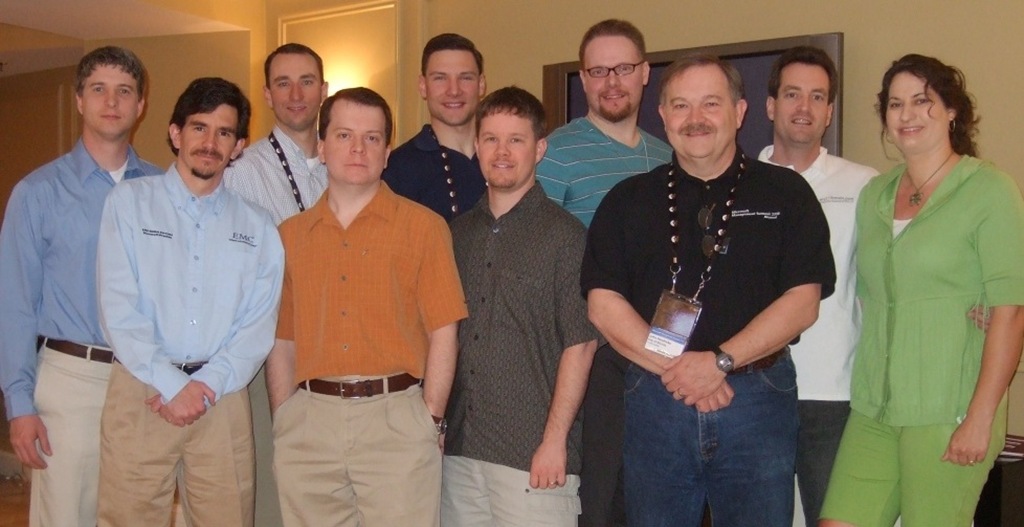
The Bible Study at MMS was really good. We spent four mornings going through the book of Philemon. We met in Rod and Megan Trent’s suite at the Venetian. It was a really good time to start the day off with a song or two, a bit of prayer, and some time in the Bible before heading into the crazy MMS schedule. Over the course of the four days we had about fifteen different people in the study. There was a core group that was there every morning. Some people flew out early or were unable to come on certain mornings. It was really neat to be able to connect with people on a personal/spiritual level in the midst of a massive IT conference in the midst of “Sin City”. The picture below was taken Thursday morning. As a group we agreed that this was the “First Annual MMS Bible Study”. Very cool.
From left to right…the “Redfly Guy” (don’t know his name), Brian Leary, Tim Benjamin, Matt Dewell, Joey Gleason, me, John Nelson, John Hendricks, Rod Trent, and Megan Trent. Someone gave Megan the nickname of “myITforum Den Mother”.
My touch with "fame"
It was truly amazing the number of people who came up to me last week as a result of the video at MMS. All week I had people recognizing me from the video. Some just stopped me to say they liked the video. Quite a few wanted to pick my brain about what I had done with OSD in SCCM. Honestly…it was a lot of fun to be able to meet so many people and to hopefully help out a few.
One of the funniest comments came from Brian Mason. I had met him last year at MMS when I tracked him down to ask for input on deploying patches with ITMU in SMS 2003. Every time he saw me in the hallways after the video he called me a “rock star”. He had me laughing. I really enjoyed a couple of the conversations I had with Brian between/during sessions…the one that we had while skipping the last keynote was exceptionally helpful. Thanks Brian!
I also had a series of funny run-ins on the way home from MMS. As I was in the Southwest Airlines check-in line in Las Vegas, the guy in line behind me was flying to Nashville. He recognized me from the video and made a comment about it. Later, after landing in Orlando, the guy sitting directly in front of me on the plane also mentioned seeing the video. Then…while standing in the baggage claim area waiting on my luggage to come through, I had another guy from the conference come up to me saying something about the video. It was really wild.
To everyone who came up to me throughout the week…thanks for the encouragement. I hope I helped a couple of you. Keep checking back to this site. I will continue to post about the SCCM things that I am working through. Hopefully it will help some of you.
MMS Video
It was cool seeing the video on the screen at the State of the Nation session at MMS. Here are a couple of pics I took during the session. That is Bill Anderson from Microsoft on the stage. I like the title of the slide he used to intro the video…”Kindergarten MCSE”. The second shot shows a portion of the video where Marybeth is clicking to deploy a computer using SCCM’s OSD.


SCCM OSD Video
This is the video that I posted about yesterday that was shown during the “State of the Nation” session at MMS this morning. It features me talking about how we are using SCCM OSD, and concludes with my five year old daughter using SCCM to deploy seven computers. Enjoy!
My SCCM OSD Video
A few weeks ago I got an email from Rod Trent about MMS. He said that Microsoft was looking for “face of the customer” videos to show during various sessions at MMS this year. I was already planning to put together a video to use at a technology meeting that we have at the office every month, so I figured I’d send it in. The original video plan was to take the OSD process and condense it to five minutes so that I could present it at that technology meeting.
As I got to thinking about the video, the concept for the video changed a bit. I still wanted it to communicate what I’ve done with SCCM and OSD, but I wanted it to be funny also. I talked to a friend at the office who is a director/videographer, and he did a quick video shoot and processed the video for me. A really big thanks to John Boggs for doing that. Thanks bud!
Anyway, I sent in the video, and the guys at Microsoft loved it. I got an email from Bill Anderson who is the Lead Program Manager for SCCM. He said their whole team was laughing hysterically at it, and they want to use it during the “State of the Nation” session at MMS. This is the largest session at MMS outside of the keynotes! There will probably be 2000 people at that session. Very cool!
Now…with that said…I personally feel like I look like a dork. It was my first time in front of a camera…and it shows. The second half of the video makes up for it though. I’m going to post the video on my blog after the session (tomorrow at 10:15am Pacific). Come back to take a look at it. I have it scheduled to post at 11:00am Pacific.
MMS – Benefits
I’m at MMS this week in Las Vegas. Great conference with some of the best training in the world on everything in the Microsoft management space. Hands down…the people who know the most about this stuff are at the conference.
One of the side benefits is not just the training from the speakers, but the interaction with other attendees. After I arrived last night, I caught up with my friend Joey who I met at MMS last year. Over dinner at Chipotle, we were talking about what we had been doing with SCCM. I mentioned one issue I had been having (getting an OSD Build and Capture Task Sequence to apply software updates…since the machine is in a workgroup instead of a domain at that point). He had run into the same issue, and was able to tell me the answer to it. (It’s a WINS settings mode that needs to be set.)
I had only been in town one hour. I hadn’t even gone through registration yet. I’ve already chalked up my first benefit of the conference. I’m keeping a list of the benefits that I can specifically point to this year. It will help me when budget time rolls around again.
Add domain user to local administrators group
As part of the SCCM system that I am implementing, I am trying to streamline and automate as many functions as possible. I currently have an SCCM Task Sequence set up that can run a complete computer install (partition disk, format, install Vista, apply device drivers, install programs, install updates, etc) with no administrative input. One aspect that I am not able to automate is adding the domain user to the local administrators group on the workstation. I don’t want to use Group Policy to add a group…I don’t want everyone to be an admin on all workstations. I want to limit it to just the user being an admin of their single computer.
I had hunted for a way to do this in as fast a way as possible, which rules out using the GUI…it needs to be scripted. I tried it in VBscript, but simply could not get it to successfully add a user who was in a sub-domain. It would work for the top domain, but not for the sub-domain.
So I switched my thought process to PowerShell. I don’t know that I will ever go back. I had a working script in probably ten minutes. I then modified it and gave it some better logic, but even that went quickly. Honestly, the part that took the longest was learning the syntax for PowerShell. The script is below. You can also download it here. (PDF…my hosting provider doesn’t allow script or txt file uploads.)
###################################################################
# Name: Add2Admin.ps1
# Author: Jarvis Davis
# Company: Campus Crusade for Christ
# Creation Date: April 2, 2008
#
# Purpose: To quickly and easily add/remove a domain user to/from
# the local administrators group on a computer
#
# Inputs: It accepts the first four strings after the script name
# and puts them into variables Continue reading
Bible Study or Prayer Time at MMS?
Over the last couple of years I have made contact with quite a few people in the SMS/SCCM community who have let me know that they are a Christians. Typically the conversation came up when they found out that I work for a non-profit ministry.
Last year at MMS I wondered if there would be any interest in having a Bible Study or prayer time during MMS, and wanted to throw out this idea to see who would be interested, and if so what type of time people would be interested in. Right now the idea is really wide open. Some ideas of what it could be…
- A daily 15-30 minute Bible Study (before breakfast maybe?). I could adapt the material that I have been teaching at my church on the book of Philemon.
- A single longer Bible study at some point during the week.
- Daily short prayer time.
- Any other time for the above that could work with the really busy MMS schedule.
So…what level of interest and availability would you have for something like that? Let me know via my contact form, and I will gather the responses and send out an email to let you know what (if anything) we will end up doing.
[Update: The Bible Study will be happening. Check out this update. I still need to know if you are interested so that I can arrange for the proper size place for us to meet.]

Subscribe
Recent Comments
-


 The Realm of the Verbal Processor