MMS Bible Study Update
Just a brief update on the MMS Bible Study that I posted about a while back. Rod sent me the info on the room that he was able to nail down for us. We will be meeting in Marco Polo 702 at the Venetian before the conference breakfast. The plan is to start at 7:30 and be done no later than 8:00 each morning to allow time to have breakfast before the first meeting. Rod has a map on his blog post to show where the room is…check it out.
It’s been cool to hear from several of you that are going to be meeting with us for the first time, and a bummer for those who have met with us before that aren’t able to come to MMS this year. Looking forward to seeing you in Vegas!
Visio Stencil for Configuration Manager 2012
Over the years I have used the Visio stencil for Configuration Manager 2007 that is on myITforum.com (Thanks Rod!). It’s been great for creating diagrams of a Configuration Manager hierarchy for various clients. With Configuration Manager 2012 on the horizon, I’ve already done a design for a reasonably large client, and I’m prepping my session for MMS which is about hierarchy simplification…having a Visio Stencil for CM2012 would be really hand. I’ve looked multiple times…have not been able to locate a Visio stencil for 2012 anywhere. Had searched every search term I could think of…had called Brian Mason (Configuration Manager MVP) and he didn’t know where to find one. Basically I had completely struck out.
Last night I was emailing Stefan Schorling (another Configuration Manager MVP) about something unrelated and at the last second thought to ask if he knew where I could get one. SCORE!!! This morning Stefan had emailed back with a link to Jean-Sébastien DUCHÊNE’s blog (yet another Configuration Manager MVP) where he has posted a Visio stencil for Configuration Manager 2012! A huge thanks to Stefan for sending the link and to Jean-Sébastien for creating and posting the stencil!
The reason it never turned up in my searches was I kept searching on “visio stencil” (with the quotes). Because Jean-Sébastien’s site is in French, those words are reversed…a search for “stencil visio” would have found the link.
5th Annual MMS Bible Study
It’s hard to believe it’s been five years since the inaugural MMS Bible Study. Every year at MMS for the last four years a group of us have met before breakfast each morning for a brief time of Bible study, prayer, discussion, etc. The first three years we met in someone’s room…most of the time in Rod Trent’s room. Last year Rod helped us actually get a meeting room at the event to meet in which worked out really well. Rod came through again this year!
I’m still nailing down what the time will look like this year (content that is), but we will be meeting Monday-Friday from 7:30am-8:00am in Marco Polo 707 at The Venetian. We will be wrapping up no later than 8:00 each day to allow time to grab breakfast and get to the first meeting.
Look forward to seeing you there. If you are planning on coming, please leave a comment below or email me via my contact form.
Here’s a pic of the fifteen of us that were there on Wednesday of MMS 2011.

Speaking at MMS 2012
I just got the alert that one of my session proposals for MMS 2012 was approved! My session will be titled “Case Study: Hierarchy Simplification With ConfigMgr 2012“.
Session Abstract:
One company, 15000 systems, 70 locations…and 23 Primary Sites in ConfigMgr 2007. This may be the poster child for hierarchy simplification with ConfigMgr 2012. Working with ConfigMgr 2012 RC1, we were able to plan the architecture redesign to simplify this down to a single primary site while expanding the ability to safely delegate management across multiple business units. This case study digs into the decision process that took place through the architecture and management redesign process.
I’m super excited! See you in Vegas!
ZTItatoo.wsf–Error 9601: DNS Zone Does Not Exist
Recently I ran into an issue where a task sequence was failing on the Tattoo step of an MDT integrated task sequence. The error that shows up in the Status Message viewer is:
The task sequence execution engine failed executing the action (Tattoo) in the group (Execute Task Sequence) with error code 9601.
The operating system reported error 9601: DNS zone does not exist.
Now…I know that the real error has nothing to do with DNZ zone. That error code was generated by the ZTItatoo.wsf script. Taking a quick look through the MDT documentation (gotta love the search function in Word) for that error code shows what the script thinks is going on…
ERROR – ZTITatoo state restore task should be running in the full OS; aborting.
So…at least I’m on the right track…but I’m in the full OS already…why the bogus error? Looking through the script shows that the script is the value of an environment variable:
If oEnvironment.Item(“OSVersion”) = “WinPE” then
oLogging.ReportFailure “ERROR – ZTITatoo state restore task should be running in the full OS, aborting.”, 9601
End If
The reason I got this error is that I had stripped out a bunch of tasks from the default MDT task sequence…including the Gather task that runs just before the Tatoo task. The Gather tasks sets a ton of variables based on the current state of the system…including the “OSVersion” variable. The only time the Gather task had run in my task sequence was at the very beginning…when it was still in PE. Adding that step back in fixed the issue.
Error Code 31 During Build & Capture Task Sequence
I’ve seen this a few times during Operating System Deployment engagements at clients. During a Build and Capture task sequence the TS will fail with a 80004005 exit code. Looking at the SMSTS log or in the status messages for the advertisement will show messages similar to:
Windows Setup completed with exit code 31
Exiting with code 0x80004005
Windows setup failed, code 31. The operating system reported error 2147500037: Unspecified error
Lovely. What the heck does that mean? Since we all know how helpful 80004005 is. :-)
In looking at the logs located in x:\windows\temp\smstslog\windowssetuplogs (I can’t remember which log file.) I found reference to setup not being able to import a critical driver. Now we are getting somewhere…which driver is it? A blasted Alps Touchpad driver. Not sure about you, but that does not rise to the level of “critical” to me during a completely hands off process like a task sequence.
Basically I left the default “Auto Apply Drivers” step in the B&C Task Sequence. The client had previously imported a ton of drivers…including the “critical” Alps Touchpad driver. Simply disabling the Auto Apply Drivers step in the TS let the task sequence continue. Since the B&C only runs on a virtual machine I don’t need that step anyway.
UDI Application Weirdness
One of the really cool aspects of MDT 2010 Update 1 is the integration of what was formerly known as Modena…now named “User Driven Installation”. This provides a very slick looking wizard that can pop up at the beginning of a task sequence to allow for customization of the OSD process. There is a lot of functionality there around computer naming, domain/workgroup joining, OU selection, adding a user to the local admin group, language selection, and others. The feature that most of my clients are interested in however is the ability to customize application deployment for apps that are not in the image (Project, Visio, Acrobat, etc).
There has been one aspect of this that has caused issues on multiple occasions that I figured was worthy of a detailed blog post. The issue comes up if you use the default configuration file (UDIWizard_Config.xml) as your starting point when you run through the UDI Wizard Designer. After customizing the applications section, you still see the default applications screen when the wizard runs…either using the “Preview OSDWizard” command or running it in a Task Sequence. What you see is:
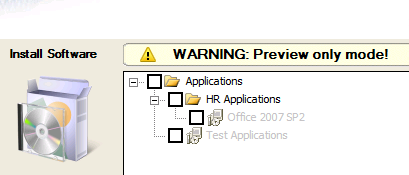
Digging into that default XML file shows us why this issue comes up. First you will notice that one of the “Preflight” checks that is performed is the “Application Discovery” check.

This allows you to configure app replacement in a re-image scenario (i.e. if Office 2007 is installed, install Office 2010…if Acrobat 9 is installed, install Acrobat X…if EditPlus is installed, install Notepad++). This really is a cool feature. However…if you haven’t configured this aspect it’s not necessary to run the check, so you can just delete it. However…deleting that from the Preflight does not clean up the other references to it in the XML file. If you edit the XML directly you will notice the following lines down in the Application configuration section. Note that there is still a reference to the AppDiscovery preflight check.
<Page Name="ApplicationPage" Behavior="enabled">
<Applications Link.Uri="preflight\AppDiscovery\AppDiscoveryresult.xml" TsAppBaseVariable="PACKAGES" RootDisplayName="Applications">
Removing the reference in the “Link.Uri” attribute resolves the issue. That section should look like:
<Page Name="ApplicationPage" Behavior="enabled">
<Applications Link.Uri="" TsAppBaseVariable="PACKAGES" RootDisplayName="Applications">
After doing so, you will see the customized application section that you configured using the wizard:

PXE Booting and IP Helper-Address Resources
I commonly work with clients who want to use PXE as the method for starting the Operating System Deployment process. In practically all instances the ConfigMgr server (and hence the PXE Service Point) and the clients are not on the same subnet. By default the PXE UDP packet will not be forwarded by the router…it will just drop it. As a result there are two methods for getting PXE to work across subnets…the IP Helper-Address and setting DHCP options.
Let me first address the DHCP Options scenario. First, this option is officially unsupported by Microsoft for getting PXE to work (per this blog post). It can work, but it may not be reliable and consistent. The DHCP options to set are a combination of 60, 66 and 67 depending on the scenario…in particular depending on whether the PXE server is on the same box as the DHCP server. The blog post linked above describes the options.
Below are a few resources that I have found helpful in understanding what the IP Helper-Address is, why you would set it, and defending the decision with the network team (which nearly ALWAYS happens). I will update this list as I find others. If
Troubleshooting the PXE Service Point and WDS in Configuration Manager 2007
Cisco IP Addressing and Services Commands
Cisco Support Forum: DHCP and PXE Question (see the response in this thread from Robert Taylor)
Trinity Explains The IP Helper-Address Command
Checklist for getting PXE to work in ConfigMgr
PXE Service Point causes the Windows Deployment Services Server service to crash and hang
ConfigMgr Version Numbers
I posted on this once before but realized last week that an update was in order. First, there were a few version numbers missing from my original post. Second…I only dealt with part of the question. When looking at version numbers for ConfigMgr, there are typically two items that someone might be referring to…the version of ConfigMgr installed on the site server or the version of the ConfigMgr client installed on the clients. My previous post mostly dealt with the site server question. This one will be an update to the original along with dealing with the client version numbers as well. BTW…I’ve seen posts scattered around the web that deal with this to varying degrees…I’m trying to gather all of the info out there into one place…something I haven’t been able to find.
ConfigMgr Site Server version numbers:
|
ConfigMgr RTM |
4.00.5931.0000 |
|
ConfigMgr SP1 |
4.00.6221.1000 “R2 installed: No” (See the screenshot below.) |
|
ConfigMgr SP1 R2 |
4.00.6221.1000 “R2 installed: Yes” |
|
ConfigMgr SP2 (RC) |
4.00.6468.2001 |
|
ConfigMgr SP2 (RTM) |
4.00.6487.2000 |
|
ConfigMgr SP2 R3 |
4.00.6487.2000 “R3 installed: Yes” |
Note: If an International Client Pack is installed it will change the second digit of the last section. ICP1 makes that digit a “4” while ICP2 makes it a “7”, so the SP1 version would be 4.00.6221.1700 with ICP2 installed.
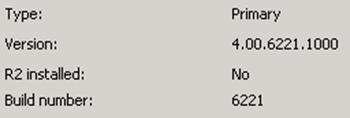
ConfigMgr client version numbers:
|
ConfigMgr RTM |
4.00.5931.0000 |
|
ConfigMgr SP1 |
4.00.6221.1000 |
|
ConfigMgr SP1 (with KB977203) |
4.00.6221.1193 |
|
ConfigMgr SP2 (Beta) |
4.00.6425.2000 |
|
ConfigMgr SP2 (RC) |
4.00.6468.2001 |
|
ConfigMgr SP2 (RTM) |
4.00.6487.2000 |
|
ConfigMgr SP2 (with KB977203) |
4.00.6487.2111 |
|
ConfigMgr SP2 (with KB977384 beta) |
4.00.6487.2119 |
|
ConfigMgr SP2 (with KB977384 beta) |
4.00.6487.2125 |
|
ConfigMgr SP2 (with KB977384) |
4.00.6487.2157 |
|
ConfigMgr SP2 (with KB2509007) |
4.00.6487.2188 |
Note: R2 and R3 do not change the client version number.
Weight Loss: Goal Achieved
Back in May Julie and I made dramatic changes to our diet and exercise. For me that meant that french fries were no longer an entire food group. I’ve probably eaten more produce in the last three months than I had in the previous three years…and that might not be much of an exaggeration. It meant that exercise actually happened instead of just being thought about. I set two goals at the time. The initial goal was to lose 15 pounds by my 40th birthday…which I did. The overall goal was to get back to the weight I was when my eight year old was born. Julie’s goal was to lose the baby weight from Sam that simply would not go away.
I achieved the second goal yesterday! My net loss is 34 pounds. I’ve dropped over 6 inches off my waist, and my heart rate has dropped from 91 beats per minute to 65. A couple of weeks ago my son called me “Skinny Daddy” when I picked him up from childcare are church. I actually might need to get my wedding ring resized because it is dangerously loose. Julie hit her target weight a week ago…I’m really proud of her! We are both within four pounds of our high school weight!
Our new goal is to maintain this weight…to be within five pounds of where we currently are on August 11, 2012.
A Healthier Me
Back in the middle of May, Julie and I were talking about both of us wanting to lose some weight. I had put on 35 pounds since our daughter Marybeth was born eight years ago. Julie had significantly less weight than that to lose. :-) I came in from work the day after that conversation, and Julie was walking out the door to go for a run as I was walking in. That motivated me to also go for a walk/run that day. And quite honestly, before I started that run I prayed a very sincere prayer for God to not let me have a heart attack while running…I was honestly nervous. That night I stepped on the scales to see what my starting weight was. The initial goal I set for myself that night was “15 by 40”…fifteen pounds by my fortieth birthday…which was 6 1/2 weeks away. That goal seemed within the realm of possibility, but it was one that I was going to have to work very hard to achieve. It was clearly going to take a lot of work.
I started eating healthier and exercising daily that week. One week later I started an official diet and exercise program that a coworker (thanks Eric!) had told me about. It sounded like the hokiest fad diet I had ever heard of…the book is even bright pink. But I knew that he had lost a ton of weight fast…which was exactly my goal.
Today is my fortieth birthday. Final result of the last 6 1/2 weeks…I have lost a total of 21.2 pounds! None of my pants fit anymore. My belt is tightened up to the last notch. I’m wearing clothes very comfortably that I haven’t been able to fit into in over two years. Overall I’m feeling fantastic…no back pain…I’m sleeping better…I have more energy. Instead of walking over half of a one mile walk/run, I recently averaged under 9.5 minutes/mile for a three mile run. Not blazing fast by any means…but exciting considering where I was just six weeks ago!
I’m still continuing the diet and exercise. Continuing to burn fat. My eventual goal is to get back to the condition I was in when Marybeth was born…so approximately 14 more pounds to go! One of the very nice things about this particular diet is that it gets you eating healthier. I’ve never eaten so much produce in my life! It also changes how you think about eating so that you don’t gain it all back after you reach your target weight. It’s actually very clear…you will be on a “diet” the rest of your life. If you go back to how you were eating before, you are obviously going to get right back into the same (bad) shape you were in before! It still sounds like a hokey fad diet…but the results don’t lie!
Another cool thing is that my wife and brother both joined me on the same diet and are also seeing awesome results. I’ve thanked her personally…and I’m going to thank her publically now. Julie…thank you for going for that run back on May 16. Don’t know why, but nothing has ever motivated me to exercise like seeing you walk out to go run that day.
Task Sequence Hangs During Updates–Fixed?
I’ve seen this many times and just found out that it has potentially been fixed. Situation is that during a task sequence, the whole TS will hang at the apply updates step. The hang occurs when the “Download xx of xx updates” shows.
In theory this has finally been fixed! I haven’t had the opportunity to test it, but it certainly looks promising! Check out this KB for the fix:
http://support.microsoft.com/kb/2509007/en-US
Thanks to Jeff Boehlke at Campus Crusade for Christ for alerting me to this. Jeff is the guy I trained to be my replacement when I left CCC a few years ago.
Easter surprise from my daughter
Our daughters have been planning for Easter for a week or so. Yesterday they asked us to take them to Target and the dollar store…but did not want my wife or I to go in with them…they were planning something for us for today.
This morning after getting up early and locating their Easter baskets (that crazy Easter Bunny always hides them in odd places)…they came into our bedroom very eager for my wife and I to come out and look for our Easter bags that they had prepared. They were very excited. Very very excited.
After locating my bag (in the coat closet), my eight year old daughter was eager for me to open it. Turns out that she had picked me, and my eleven year old had picked Julie. As I started pulling things out of the bag…more and more kept coming…multiple kinds of candy, a couple of different snack foods, a watch, a basket… It wasn’t until she mentioned using her “Mom-Mom money” that I realized what she had done. She had taken the ten dollars that her great-grandmother had sent her…and taken three more dollars out of her bank to make sure that Daddy had an Easter basket. My eight year old spent thirteen dollars of her own money on me.
Things that will bring a grown man to tears.
Green Romans?
A few nights ago as my wife was finishing up the nightly Bible reading with our daughters, my eight year old asked my wife about the trip to Israel that our local radio station (KTIS) has talked about. One of the things that the station mentioned about the trip was something about “walking in the footsteps of Jesus”. My daughter was skeptical…knowing that there is no way that footprints could survive two thousand years. Julie explained that they were just meaning that you could visit Bethlehem, Jerusalem, the Sea of Galilee and other places that Jesus visited.
Marybeth thought for a second then very seriously asked if the cross was still there. I explained how the cross that Jesus died on was very likely used many times before Jesus…and many times after Jesus because of how the Romans used crucifixion as a means of execution.
Without missing a beat Marybeth sing-songed one of the more morbidly funny things I have ever heard:
Why People Write Viruses
Tonight over dinner I was telling my wife about a conversation I had with someone today about a virus issue at a company. One of my daughters asked why people write viruses. Before I could formulate an answer I hear the lovely voice of my wife pipe up:
“Because their fathers beat them and their mothers dressed them funny.”
Now that I think about it, I don’t know that I ever did actually answer my daughter’s question! :-)
Bluetooth Mouse Losing Connection–Fixed
 For the last few years I have been using the Microsoft Wireless Notebook Presenter Mouse 8000 and absolutely love it. I got it as a gratuity for participating in a focus group. I love that it is responsive and gives me the ability to control PowerPoint or media controls while giving a presentation to a client.
My one frustration with it has been that it would randomly lose connection to the computer when using my laptop’s internal Bluetooth adapter instead of the included USB Bluetooth dongle. I don’t want to keep up with the USB dongle…I want to use the internal Bluetooth. But I also want the mouse to always work. I had done internet searches on a couple of occasions to no avail…until recently.
A couple of months ago I did another search and came across an article where someone had been having the same issue and had a potential fix to the issue…she nailed it. The issue is that the computer is turning off Bluetooth to save power. The fix is really simple.
Open up Device Manager, then open up Bluetooth Radios.

Double click your Bluetooth adapter to view properties, then switch to the Power Management tab. Uncheck the box for “Allow the computer to turn off this device to save power”.

After unchecking that box, I have not had an issue with the mouse losing connection in over two months. Problem solved. Big time thanks to Sheryl Canter for posting the fix in the article linked to above.
System Center Roadmap 2011
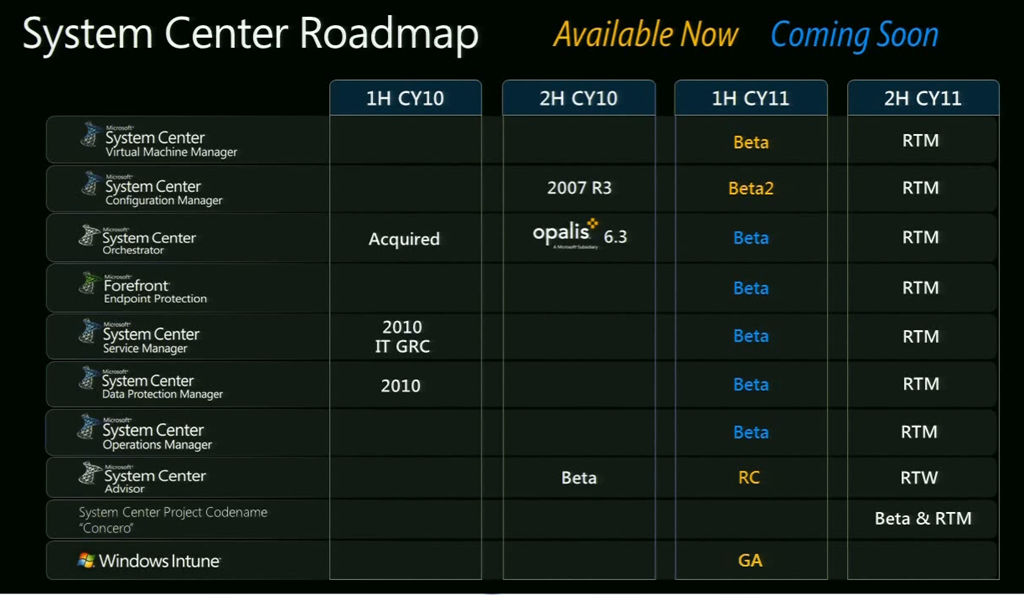
This was one of the slides from the second keynote at MMS last week. This is a slide they show every year to highlight what is coming in the System Center arena over the coming year. What is really exciting about this one is that a new version is coming for everything in the System Center family this calendar year. This is a lot of very exciting changes coming. This does come with a caution though…there’s a lot of work to be done ahead of time to be prepared for the launches!
Anti Malware–the landscape just changed
HUGE announcement at MMS just now. Forefront Endpoint Protection 2010 is now part of the Microsoft Core CAL. This means that all the customers who have a Core CAL already…which many who own ConfigMgr have it licensed via the Core CAL…ALREADY have the licensing in place for FEP…they already own it. If you have a Core CAL…it eliminates the need to purchase a separate AV license. You can just use FEP…which is managed via the ConfigMgr console…which eliminates a separate management infrastructure for malware…you simply manage it all via ConfigMgr.
This will likely have a big impact on AV vendors. I can hear clients asking the question now…”I already have FEP licensed via the Core CAL…and I can manage it with ConfigMgr which I already have deployed. Why should I renew my AV licensing with ______________?”
This is huge. It should be very interesting to see the full impact of this announcement over the next year or so.
ConfigMgr 2012 Beta 2–OSD Findings
I was poking around in one of the ConfigMgr 2012 Hands on Labs at MMS today to see what is new/different. I came across some pretty interesting things when looking at task sequences.
[Thanks to Torsten for pointing out an oversight on my part…that one of the “new things” I mentioned is already in ConfigMgr 2007. I’ve done plenty of OSD…I’ve never noticed the “Apply Data Image” task sequence step. Heck…I even pointed it out to two other people yesterday and they had never noticed it either.]
First, there is a new option for “Apply Data Image”. Not apply an OS Image…take a WIM file that does not include an OS…and apply that to a disk/partition. Definitely some cool options with that.
Second, I was looking at the “Options” tab on a task sequence item and found some new (and VERY cool) options there. The new options with their key components that were available as criteria on the Options tab are:
- File Properties
- Path
- Version
- timestamp
- Folder Properties
- Path
- timestamp
- Registry Setting
- Exists
- Not exists
- Equals
- Not equals
- Greater than
- Greater than or equals
- Less than
- Less than or equals
- Installed software
- Choose filename which fills out
- Name
- Version
- Product code
- Upgrade code
- Options for
- Match specific product (Product code and upgrade code)
- Match any version of this product (Upgrade code only)
- Choose filename which fills out
Over time I have written vbscripts to pull file properties, registry settings and installed software to then set a TS variable…which I could then use later as criteria in a “TS variable equals xyz” condition on a task. It is very cool that this will be part of the core functionality in ConfigMgr 2012.
MMS Bible Study–Details
Three years ago I started leading a brief morning Bible study at MMS. I’ve had numerous emails from people over the last few years who were very encouraged by this event. Every year up til this one Rod Trent has graciously offered his room for a meeting place. Because it was being held in his room, I’ve never posted the location on my blog to protect his room number. This year Rod’s room was too small for the group to meet in, so he contacted the MMS event staff and got us an actual meeting room. We met this morning and had a decent turnout…in spite of me not getting the meeting room info out to my email list til late last night.
If you are interested in coming, we will be meeting each morning for the rest of the week at 7:15am in Reef D on Level 2 at the convention center. If you are interested, we’d love to have you join us. We will be wrapping up no later than 8:00 each morning to allow time to get to breakfast and the first session of the day…Reef D is only a short walk away from the meal room.

Subscribe
Recent Comments
-


 The Realm of the Verbal Processor