User State Migration Tool Error Codes
I came across this page recently that I found very helpful. It is a list of all of the possible error codes that the User State Migration Tool can produce. This can be very helpful in troubleshooting a USMT issue.
USMT Error Codes on the Deployment Guys blog.
Bible Study at MMS and TechEd
Last year before MMS, I put out a call to see if anyone was interested in doing a Bible study during the week of MMS. I got a lot of very positive response, and so last year a group of us met in the morning before breakfast and spent some time studying the book of Philemon before the day started. Rod and Megan Trent volunteered to let us use their room to host the study. Around Thursday of that week, someone in the group mentioned that being the “1st Annual MMS Bible Study”.
So…who’s ready for the “2nd Annual” study? We are going to change the format up a bit this year. We’ll probably spend a bit more time in praise and worship than we did last year. Also…last year I intentionally chose a book of the Bible that people were likely to be unfamiliar with…this year we will be looking at a book that people are more likely to have read…Philippians. Specifically we will be looking at what that letter has to say about the way we treat those around us. I also plan to do a similar Bible Study at TechEd in LA this year.
So…who’s interested? If you are, please either send me an email or use this blog’s contact form. Let me know which of the two (MMS, TechEd or both) that you are interested in.
Looking forward to seeing you in Vegas or LA!
No Assigned Task Sequence
I’ve been setting up a virtual ConfigMgr environment on my laptop to use both for demonstrating at client locations as well as to use for the demo portions of my presentations at MMS and TechEd. It’s running inside Virtual PC 2007, and the server VM is running Windows Server 2008 and ConfigMgr 2007 SP1 R2. It actually runs pretty peppy…I do have the VM running on an external 7200 RPM hard drive connected to my laptop via an eSATA cable.
Anyway…I set up a Task Sequence to do my OS build and capture. It worked fine. Then I imported that WIM file and set up another Task Sequence to deploy that image. It was advertised to both the “All Unknown Computers” collection as well as a special OSD Deploy collection that I had created and imported the name and MAC address of the new VM into.
After booting the new VM with the Bootable Task Sequence media CD, it kept giving me this error message: “Failed to Run Task Sequence” “There are no task sequences available for this computer.” If I looked in the smsts.log file located at “X:\windows\temp\smsts”, I saw an error entry stating: “No assigned task sequence.” Looking through the log file, I could see that it was reading the correct MAC address and had the right SMS GUID that was assigned to the system that I imported. So it was clearly recognizing the machine. It was talking to ConfigMgr correctly. It was downloading policy, but it was determining that none of those policies were applicable. If I looked at the properties of either the Collection or the system, it showed that the advertisement for the Task Sequence was applicable to that computer. So…why would it show as applicable in the GUI, but not be evaluated as applicable during the task sequence?
After beating on this for entirely too long, I finally figured it out this afternoon. I had done a housekeeping task on my VM to move all of the default “All…” collections off of the root of the Collections node (see this post). After doing so, I had forgotten to update those collections after “moving” them. Shouldn’t matter…except that the “All Unknown Computers” collection was completely empty…including not having the “x86 Unknown Computer (x86 Unknown Computer)” or “x64 Unknown Computer (x64 Unknown Computer)” entries.
When the new VM was evaluating policy, it went through the following steps in the SMSTS.log.
Client Identity: GUID:24e41bb6-2d68-451a-9802-29f9f1bdd1ea
Netbios name: NewComputer
Client GUID = GUID:24e41bb6-2d68-451a-9802-29f9f1bdd1ea, Netbios name = NewComputer, State = Unknown
Client is unprovisioned
Using unknown machine GUID: 1b554c94-8eeb-490a-8b10-ae10bd579d3d
Unknown client identity: GUID:24e41bb6-2d68-451a-9802-29f9f1bdd1ea
Preparing Policy Assignment Request.
Setting transport.
Setting site code = CM1.
Setting client ID = 1b554c94-8eeb-490a-8b10-ae10bd579d3d.
Executing Policy Assignment Request.
Note what happens to the GUID. It starts off with the GUID that starts with “24e41…” and a state of “Unknown”. It then switches the GUID that it is going to use for the rest of the process to the “unknown machine GUID” which on my system starts with “1b554…”…this is the GUID for the “x86 Unknown Computer (x86 Unknown Computer)” resource that should be in the “All Unknown Computers” collection. After switching the GUID, you see the last line that I pasted in above where it is “Executing Policy Assignment Request.”
Because I had not updated the collection…and the “x86 Unknown Computer (x86 Unknown Computer)” resource didn’t exist in any collection…there wasn’t any advertisement that was applicable to that GUID. It behaved exactly like it should have. It just took me a long long time to figure out why it was failing. Once I updated the collection, the “problem” went away.
In this instance, it was definitely a PEBKAC issue…Problem Exists Between Keyboard And Chair.
How to Move Collections in ConfigMgr
One of the little aspects of working in the ConfigMgr console that I don’t like is the number of builtin collections that are all at the top level of the collections node (“All Systems”, etc). I don’t like that they take up so much room at the top of the list (since they all start with the word “all”) and causes me to need to scroll/search in order to find the collections that I have created. I would prefer to have them in a folder (which doesn’t exist in the Collections area because of the way security works in collections). You will also note when right-clicking a collection, that there is not a “move” option. So…how do you do it?
While you can’t create a true folder, you can use subcollections. Start off by creating a new empty collection named “Z_All Builtin Collections” at the root of the Collections node. After it is created, right click this “Z_All…” collection and choose New, then “Link to collection”. In the dialog that pops up (screen shot below), choose the topmost “All” collection which is probably “All Active Directory Security Groups”, then click OK. 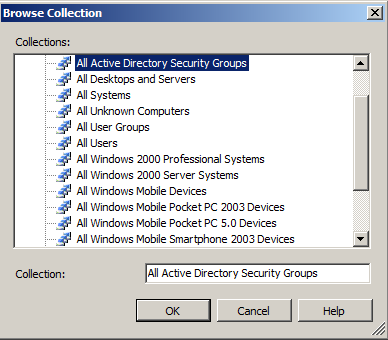 Repeat this process for all of the builtin collections. Make sure you don’t skip any of them. Once you do that, you will have the original collection at the root level and a link to that collection underneath the “Z_All Builtin Collections” collection. This link is an identical replica of the original…even down to the Collection ID.
Now…go back to the original ones, right click it and choose “Delete”. This will bring up the “Delete Collection Wizard”. Click next, then note that this is a dialog for deleting an “instance” of the collection. You can delete the original instance while leaving the one that you created in the “Z_All…” collection intact. Repeat for all of the original ones.
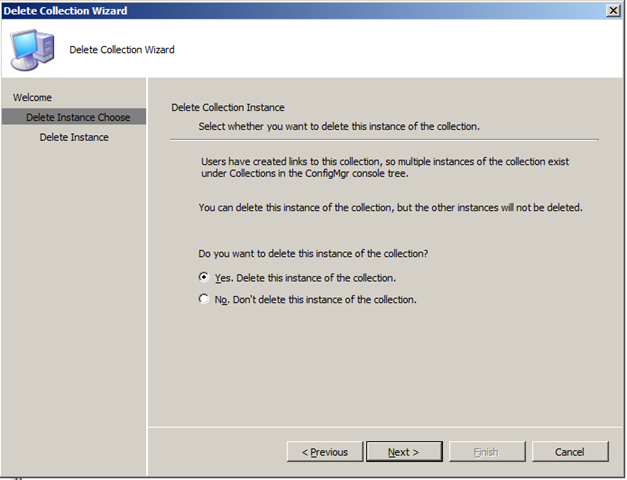
After doing this, you will have a Collection node that looks something like this:
 Now that you have done this, be sure to update all of these collections…you could run into problems if you don’t. More on that in my next post.
Spring in Minnesota
 Spring has arrived in Minnesota. Matter of fact, last Saturday my family got to watch it arrive in a really dramatic way. We went for a short hike in Henry’s Woods near Rogers. This is land that was given to Hassan Township by the Henry family for use as a park.
As we were hiking along, we were walking up the side of a frozen over streambed. As we were coming up on a bend in the stream, we saw water flowing down. This water was slowly making it’s way downstream, melting its way through the streambed. We followed it downstream for probably an hour just watching it slowly meander around the bends until it connected with another melted area at the far end of the property just before it went under the road. It was really fascinating watching this happen. When we first saw it, I didn’t have my digital camera to take any decent quality pictures or video…just my cell phone. I raced home to grab my camera and head back to get some good pictures and video. Here is a video of what we saw…
TechEd Bonus – Free Software
Just got an email from the TechEd conference that had two main bits of information. First…they have cancelled the “Attendee Party”. I’m not overly concerned about that. Second was this little nugget:
Additionally this year you will receive a full copy of Windows 7 and Windows Server 2008 R2 when released to market as part of registration.
Sweet! I had just been thinking about building a server for my home as a central place for my wife and I to store data as well as to have a powerful lab environment for me to learn on. Now I will have a copy of Server 2008 to run it with along with a copy of Windows 7 to put on our home computer!
ConfigMgr Version Numbers
This post is out of date. A more complete listing of both site server version numbers as well as client version numbers can be found in this new blog post.
I have been installing ConfigMgr in a virtual environment on my laptop this week. This will serve as both a Demo environment for my MMS/TechEd presentations as well as a “Proof of Concept” environment when I am talking with clients.
I was wanting to check which version of ConfigMgr I had installed but wasn’t able to quickly locate the version numbers for each version, so I figured I’d post this out to help others.
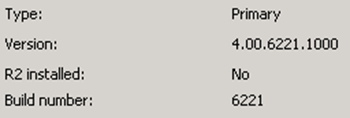
Go to ConfigMgr Console / Site Database / Site Management, then right click your site and choose Properties. The version will be listed on the properties screen.
| ConfigMgr RTM | 4.00.5931.0000 |
| ConfigMgr SP1 | 4.00.6221.1000 The “R2 installed” field will state “No”. (See the screenshot below.) |
| ConfigMgr R2 | 4.00.6221.1000 The “R2 installed” field will state “Yes”. |
| ConfigMgr R2 SP2 (RC) | 4.00.6468.2001 |
| ConfigMgr R2 SP2 (RTM) | 4.00.6487.2000 |
Over Caffeinated Documentation
Last week I spent a couple of days working on creating a deliverable document for a client. Specifically it was for a Desktop Deployment Planning Session that we performed at a client. Over time I have learned that I work more efficiently in certain environments. Home…we don’t currently have a good workable office environment, so there are generally too many distractions…TV, kids, etc. Office…sometimes…but again there are distractions…generally I’m a social person, so I end up getting into conversations that suck time out of the day. And realistically…if I’m working on documentation or training, I can save the commute time and work from somewhere else.
Generally I have found that coffee shops work well for me. I don’t know anyone there, so I’m not going to get into conversations. And once I put on some instrumental music, I’m not going to hear any of the other noise in the place that would distract me. (Favorites for work music: the Gladiator soundtrack and “Acoustic Sketches” from Phil Keaggy. If I’m programming/scripting, I’ll typically go for something more high energy even though it’s not acoustic…”Bloom” from Audio Adrenaline. Although some old R.E.M. or SonicFlood works well also.)
So last week I’m in Dunn Bros Coffee working on the doc. First thing each morning I would buy a small dark roast coffee. Free refills all day. Every time I started to fade and lose focus on the doc, I’d go for a refill. By end of day Friday I was way way over-caffeinated. If you’ve seen the movie “Over the Hedge”…I was Hammy. The following day I was still a little sick. The combination of too much caffeine and being a bit dehydrated was really not good.
But in the end…the doc was finished (approx 20 pages), and it was really good. I was very pleased with how it turned out. Still needs a few more points about Business Value related to my recommendations for the client, but that shouldn’t take long.
Sam Pictures
I’ve had a few friends ask to see more pictures of Sam, so I finally sat down last night and picked out a few new ones to post.
This blue sweater was hand knitted by our CEO’s wife…thanks Marty!

Little dude had his eyes on the prize when Julie pulled out the chocolate I gave her on Valentine’s Day!

“I’m thinking very very hard right now.”

“MB loves me…can you tell?”

“So does Laurel.”

“Mommy loves me too.”

“And Daddy likes my hugs. Hey…what’s not to love?”

Marybeth enjoys reading to Sam. He will sit there totally enthralled as long as she keeps reading.

“I didn’t so much enjoy hiking until Mommy let me inside her jacket.”

“I was very tired.”

Full Screen Reading – Shortcut Key
One of the features of Word 2007 that I like is the “Full Screen Reading” mode. It really makes it easier to read/review a doc…especially a long one. Matter of fact…I do most of my editing in that mode as well. Most of the docs I work with are long, so pulling it up in full screen reading mode…(two pages on my 1920×1200 laptop screen) makes it easy to see where I am in the document as I am reading/editing. Definitely helps in maintaining the flow of the doc.
So…I switch to reading mode frequently. I also love keyboard shortcuts. Full Screen Reading mode does not have a keyboard shortcut assigned to it as far as I have been able to discover. So…I created my own. This is fairly basic, but here it is in case you’ve never seen how to do it…
Choose the Office “Orb” (top left corner of Word), then Word Options, then Customize, then click the Customize button to open the Customize Keyboard dialog box. In the “Categories” field, select “View Tab”. Then in the “Commands” field, select “ReadingModeLayout”. Click in the “Press new shortcut key” field, then choose what you want the new shortcut key to be. I choose Alt + F…hold down the Alt key and press the F key. This should show something like “Alt+F” in that field…then click “Assign”. That’s it. I now have my Full Screen Reading shortcut key.
Death By Slidedeck
Over the last couple of days, we have been starting going through a Desktop Deployment Planning Service (DDPS) at a client. A DDPS is essentially a planning service that helps a company understand the tools, best practices and processes for everything in the arena of desktop deployment…operating system image creation/deployment, application deployment/packaging, patching, user state migration, security, Office config/deployment, etc.
The first three days of a DDPS are going through a series of PowerPoint slidedecks looking at all of those issues, discovering what is true of the client’s current environment and processes, helping them determine where in the IO Model they would like to end up, and then mapping out a plan for getting them there. There are a lot of slidedecks. A lot of long slidedecks. Over the last two days I talked through eleven and a half hours of slidedecks. I’m beat. I have rarely been so ready to see a weekend.
Leather Jacket – Good Deal
This post falls under the category of most people won’t care, but I’m going to ramble about it anyway.
Since moving to Minneapolis I have stocked up on winter clothes. I bought the heavy duty winter jacket a while ago, but I really wanted a nicer looking jacket to wear to work. One that looked more professional going into a client location. Last week I finally got it.
I’ve been watching a leather jacket at Kohl’s since November. Back then it was being sold for $295. If you know me, you know that I’m too cheap to spend that much on a jacket. So I continued to watch it. I’ve watched it go down in price multiple times, and last week finally bought it. It was 70% off…and I had a 15% coupon to tack onto that. Final price: $75. I’m probably just as happy about the deal I got as I am with the jacket!
Now here is the trick. While the jacket is insulated…it isn’t going to hack the depths of a Minnesota winter. It’s fine down to around +5F. Any colder than that and I will probably still wear my Columbia jacket…but then…when it’s below zero practically everyone is wearing coats like that.
Blog Stats
One aspect of blogging that has been a bit addictive to me is blog stats. WordPress.com (where this blog is hosted) gives really good stats. Aside from the hit totals that you would expect, it also gives you top posts, top referrers, search engine terms, click throughs as well as incoming links. So, over the last five months I’ve been watching the monthly hit rate climb and approach 5000 page views. It came close in October, November and December, but didn’t quite make it…Thanksgiving week and Christmas week had lower than average hit totals. January finally hit the mark. It’s amazing to me that my little blog is getting that much traffic.

Presenting at TechEd Too???
Last week I had big news about being invited to be a presenter at the Microsoft Management Summit. That was huge and very encouraging…a very big week. Then came Friday afternoon…
I’m at my daughter’s school watching her in a Geography Bowl competition (which she won!). Just as it was starting, my phone buzzed…an email. I took a quick glance just to see who sent the email. It was from Martin Dey again. Here is part of what it said (copied with Martin’s permission):
The product team liked your topic “Operating System Deployment (OSD) in the Real World” so much they asked me to also propose it for the TechEd US event. They felt this was one of the strongest industry proposals we had received across both MMS and TechEd .
So I went ahead and cross-submitted your topic, and I’m pleased to report it has also been selected for the TechEd US event in Los Angeles in May.
I almost dropped the phone. Wide eyed, I looked over at my wife and told her, “I just received a really big email. We need to talk after this is over.” I spent the rest of the afternoon shaking my head and repeating “Wow”. To say that I am excited would be an understatement! And honestly, that statement from Martin is both honoring and humbling at the same time. Wow was that encouraging. As a family, we went out to celebrate Friday night. Laurel wanted McDonald’s. I wanted Chinese. We did both!
I still need to confirm that I can get the time from Virteva to do the TechEd event, but I don’t think it will be a problem!
Update: Just found out from my leadership that I can officially accept the TechEd speaking invitation!
Taxes
A good friend of mine posted this on his blog back in October. I just saw it tonight and enjoyed it. With our messed up tax system here in the US, what would it be like if ten friends paid their bar tab the way that we pay taxes?
http://blogs.kranich.org/karl/2008/10/30/taxes/
FairTax anyone?
Presenting at MMS 2009
This morning I got an email from Martin Dey (Microsoft) confirming that my session proposal for MMS 2009 has been accepted! I will be presenting at the Microsoft Management Summit in Las Vegas! My session is titled “Operating System Deployment in the Real World”.
I’ll admit…there is certainly a combination of excitement and terror going through my head at this point. Looking forward to it…but I’m also aware that there is going to be a lot of work between now and April 27 to prepare for the session.
See you in Vegas!
Acronym Soup
Last week I attended a two day DOVO training (Desktop Optimization using Windows Vista and 2007 Microsoft Office System) at the Microsoft office in Chicago. This was the first time that this training was offered in the US, and it was taught by Steve Campbell from Microsoft. A blurb about DOVO is:
DOVO is a service offering designed by Microsoft Consulting Services (MCS) that was developed around industry best practices for desktop automation. DOVO guidance helps partners automate large scale desktop deployments, accelerate and streamline adoption, simplify desktop management, and help reduce system complexity.
DOVO leverages Microsoft tools and technologies for deploying the desktop. Based on the Microsoft Deployment Solution Accelerator, it is designed to fully capture the benefits of desktop optimization by helping reduce total cost of ownership, improve user productivity, and increase agility.
Anyway…during the training, we kept a running list of acronyms and tools on the white board. It got to be comically long. Here is the list. How many can you interpret? If you think you know them all, leave a comment with what they stand for. I’m curious if anyone can get all of them. There are a couple of obscure ones.
SA
MAP
ACT
UIA
SMS
MDT/BDD
SCCM
MDOP
AIS
OCT
IO
WINPE
LTI
ZTI
ZTP
UAC
GPMC
SMP
WDS
RIS
HTA
DDPS
ADRAP
SOW
DOVO
OMPM
MOF
MSF
ADDS
WAIK
SCOM
WIM
POC
DART
MAK / KMS
Gimagex
SQL
Bulldog Cookies
Anyone who knows me for long knows that I am an Ole Miss fan. I had been part of the Central Florida Ole Miss Alumni Club for several years and was very pleasantly surprised to discover that there is a Twin Cities Ole Miss Alumni Club. It’s nice to have other like minded people to be able to get together to watch ballgames with.
One of the games that Ole Miss plays every year is the Egg Bowl. This is the game against the Mississippi State Bulldogs at the end of the regular season. It is named such because of the trophy that features a brass football, but the football is the shape of a football from 1927 (the first year the trophy was awarded), which looks more like a rugby ball…kinda egg-like. Anyway, this year was a very lopsided Ole Miss win (45-0). The Ole Miss defense held State to 37 total yards…and negative 51 yards rushing. They sacked the three Bulldog quarterbacks 11 times. It was pretty ugly.
Now, I don’t get into sports trash-talking. I’ve never enjoyed it. I don’t like being on the receiving end of it, and I don’t intentionally dish it out myself either. All that to make sure this next part isn’t misinterpreted…it’s not trash talking…just something I thought was funny. The week after that game I got an email from one of the guys in the Central Florida Ole Miss club. His ten year old nephew had come up to him with a question:
How do you make bulldog cookies?
I don’t know, how do you make bulldog cookies?
You put them in an Egg Bowl and beat the heck out of them for four hours.
Searching the ConfigMgr Documentation
I have often been frustrated with the online ConfigMgr documentation library. It is simply not very user friendly. The organization is cludgy, but what really has made it unusable is that the search function on the page can’t be restricted to just the ConfigMgr section…it finds results from all of TechNet. I don’t want results from Exchange…I just want the results from ConfigMgr.
Today I came across an article written by Cliff Hobbs about this very issue…along with how to restrict the searches to give the results you are looking for. The info in that article actually makes the doc library usable. Although…I still say it needs to be overhauled to be more user friendly. You shouldn’t have to remember a search string to enter in order to be able to restrict the results.
The basic gist is that in every search you must include the following in the search string:
site:technet.microsoft.com "configuration manager"
Thanks a ton for posting that Cliff!
ConfigMgr Documentation Error
This morning I was doing some research on Maintenance Windows. As part of that research, I was looking at the ConfigMgr documentation library at the “How to Set a Maintenance Window” page. On that page is the following quote:
Advertised programs with the Maximum allowed run time option set to Unknown will fail on collections with a maintenance window set if that window is set to less than 12 hours (the default run time setting for Unknown).
That didn’t sound right to me. I remembered sitting in a Hands On Lab at MMS this year where Wally Mead made the statement that “Unknown” was evaluated as 120 minutes by maintenance windows. So…which one is accurate? I sent off a quick email to Wally to find out. The response I got back was pretty amusing.
Apparently the ConfigMgr dev team originally had ConfigMgr set to evaluate “unknown” as 720 minutes (12 hours), then shortened it to 120 minutes…but then finally settled on ignoring it entirely. So…a patch/app that has “unknown” as the maximum allowed run time will not be restricted from running based on a maintenance window.
I asked Wally when this change took place, and he confirmed that this non-restriction was in the RTM version. So…regardless of which version of ConfigMgr you are running, an “unknown” run time program will not be restricted by a maintenance window.

Subscribe
Recent Comments
-


 The Realm of the Verbal Processor